Back in June and July, I spent a month away from Reddit and Twitter, visiting the site only in a strictly time-boxed twenty minutes at the end of the day. During that isolation,
I realised how much the endless rapid scroll-and-read tired my brain out. I was starting each working day with a depleted brain, right after I had refreshed it overnight. Starting my day with my small list of websites and my RSS instead of scrolling through Twitter and Reddit makes for a much clearer rest of the day
Another good thing that emerged from that period is my daily practice of 20 minutes of solitude, which I do while sipping my cold brew in the morning. Solitude
… means not simply being alone, but being alone with your thoughts. So watching TV or Netflix, reading a book or articles, listening to music or a podcast, even if alone, do not count as solitude – your mind is still receiving, as the author says, “input from other minds”.
This has worked out well for me, and it is now something I look forward to.
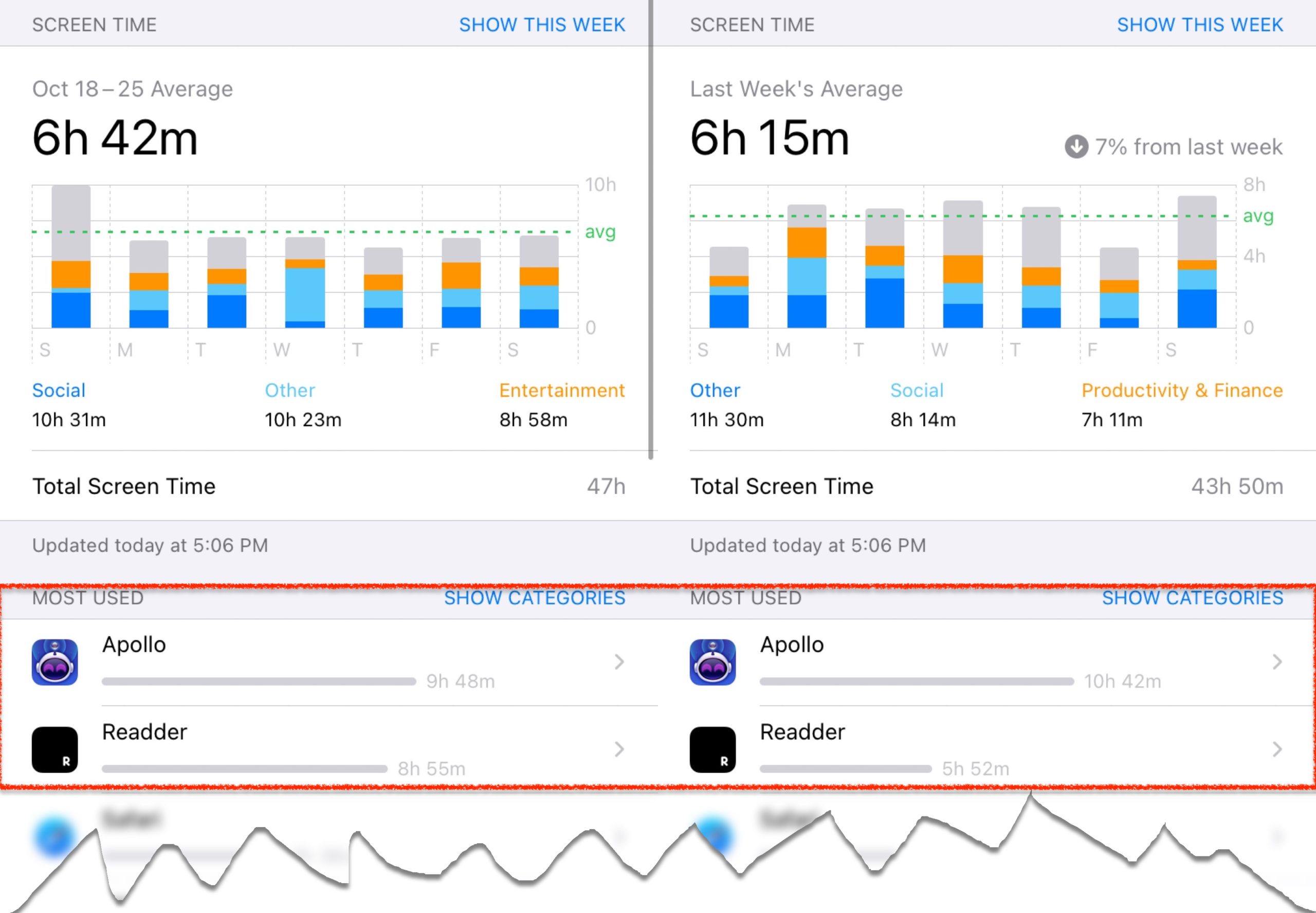
However, I’ve slid back into reading unhealthy amounts of Reddit. This chart, from iOS’ Screen Time, shows numbers I am not proud of:
That’s 2 hours 21 minutes every day during the last two weeks of October.
There is much to like about Reddit. I have been deliberate about the subreddits I am on, avoiding negativity and divisiveness. Because the network is anonymous, there’s no envy or fomo on someone else’s achievements – just plain happiness for them.
But not only it is a large time suck, it’s also not time that I spend deliberately. I am not even aware of my opening my Reddit apps, and coming out of a Reddit scroll binge feels not unlike awakening from a deep nap. Hours have passed by without you being aware of them. This is not how I’d like to live, as we just saw:
So I’m checking myself into Reddit Rehab, again. From 6th November to 5th December I’m going to time-box my Reddit usage to twenty minutes at the end of the day. I’m hoping that along with my practice of solitude and of greater deliberation, I’ll be able to use Reddit more consciously.
Let’s see how this goes. I’ll report during and at the end of the isolation.
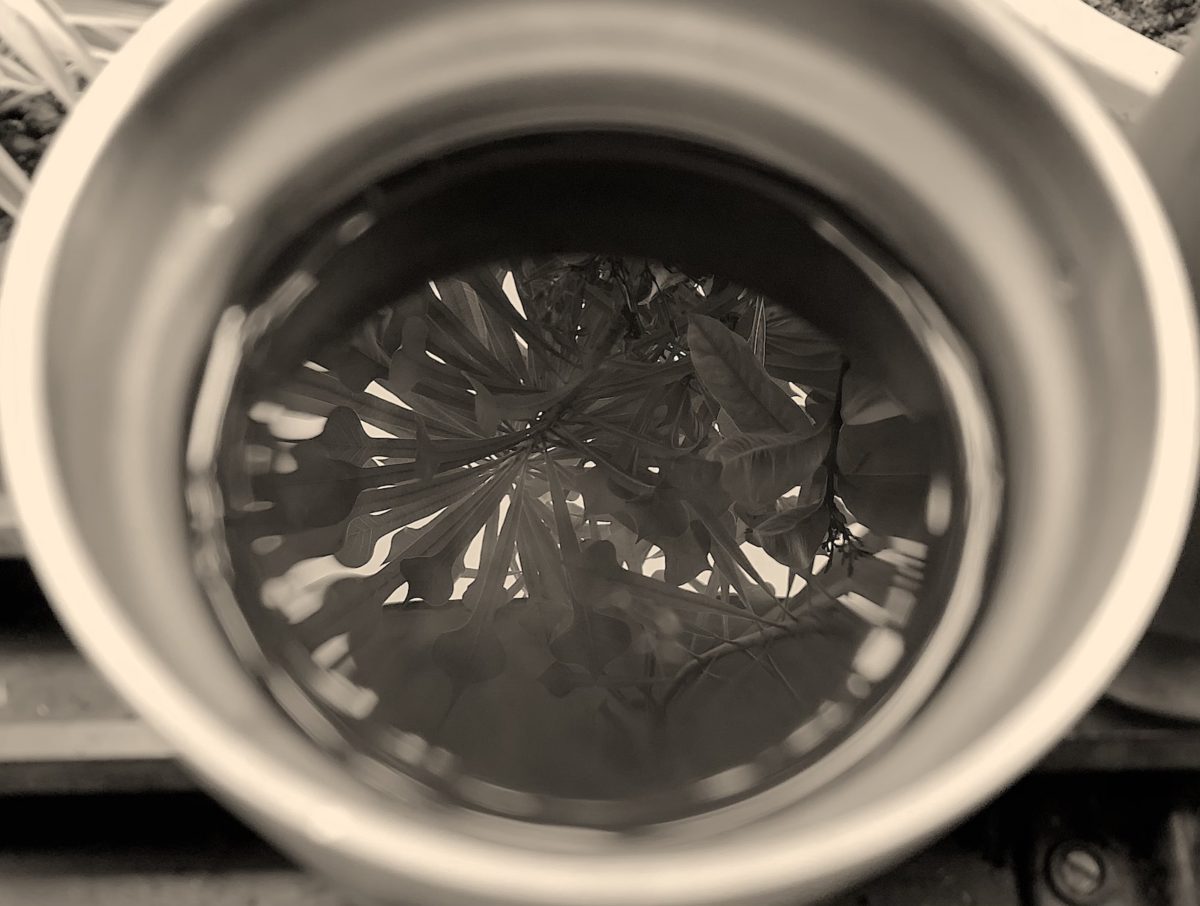
(Featured image: Frangipani reflected in my morning cold brew)
The musician David Bowie was remarkably prescient in a 1999 interview about what the Internet would do to society:
… I think that we, at the time until at least the min (19)70s, really felt that we were still living under… the guise of a single and absolute created society where there were known truths and known lies and there was no kind of duplicity or pluralism about the things that we believed in.
That started to break down rapidly in the 70s and the idea of a duality in the way that we live. There are always two, three, four, five sides to each question. The singularity disappeared and that, I believe, has produced such a medium as the Internet which absolutely establishes and shows us that we are living in total fragmentation.
I don’t think we’ve even seen the tip of the iceberg. I think the potential of what the Internet is going to do to society, both good and bad, is unimaginable. I think we’re actually on the cusp of something exhilarating and terrifying!
… It’s an alien lifeform!
I’m talking about the actual context and the state of content is going to be so different to anything we can really envisage at the moment, where the interplay between the user and the provider will be so in simpatico, it’s going to crush our ideas of what mediums are all about.
Except “the interplay between the user and the provider will be so in simpatico”, he was right about several things: the magnitude and imminence of change, the fragmentation of opinion and of truth and the emergence of new forms of content, entirely new mediums.
The 16 minute interview with BBC Newsnight’s Jeremy Paxman is on YouTube. The quote above starts at 9 minutes 10 seconds in:
It’s not entirely an illusion. Without the usual work mixers, festive holiday celebrations, far-flung vacations or casual dinners that typically mark and divide the calendar, the brain has a harder time processing and cataloging memories, psychologists say, and the stress of the year itself can shift how our brains experience time… Sheer monotony has the ability to warp time and tangle our memories, psychologists say, with quarantines and lockdowns robbing us of the “boundary events” that normally divide the days, like chapters in a book.
… to live deep and suck out all the marrow of life, to live so sturdily and Spartan-like as to put to rout all that was not life, to cut a broad swath and shave close, to drive life into a corner, and reduce it to its lowest terms
Neat.
In more prosaic terms, in my interpretation,
Living deliberately is making an active choice in how to spend one’s time – and, over weeks, months and years – one’s life.
Each of us has some leeway in the everydays of our life, even if not in immediately in the broad strokes. We can make choices to pursue what is dear to us, or to invest in ourselves, or to become part of something larger than us, or any combination of these.
We can choose to restart an interest of ours. Re-engage with communities and groups we’ve fallen out of touch with. Start a new hobby we’ve always liked but didn’t know if it’d stick. Pursue our physical and mental well-being. Join a local cause. Whatever it looks like for each of us. And do it for no reason than because we can.
We do this by examining how we spend our average day, which in 2020 looks like all other days. And being honest with ourselves about which things we do by default. Which things we do inefficiently. Which things we would be better off trading for something fresh.
We also do this by actively using the technology in our lives in addition to its passive consumption. We can be deliberate even with consumption-only tools: finding shows and/or documentaries on Netflix about an interest of ours, instead of merely accepting its recommendation about what to watch next. Or creating a new Reddit account with fewer but more carefully chosen subreddits and using that for a few weeks.
Being deliberate means we spend most hours actively making a decision about how to spend them, instead of letting habits and circumstance dictate this. Consequently,
Fewer hours just slip by. Days begin to look different. Milestones emerge. Memories form. A narrative forms about how we spent October or November. Time crystallises, no longer disappearing through a sieve.
This is not to diminish the very real constraints each of us face, whether they are problems with money, health, relationships, opportunities, quality of life. The principle is simply to recognise and act on whatever agency we have in our lives, however large or small it may be.
2020 is the epitome of the adage the days are long but the years are short. By spending each day deliberately, we can lengthen some of those years.
I wrote earlier about the code of the youtube-dl project being taken down by the Microsoft-owned code-hosting website Github, in response to a notice by the American music industry’s RIAA.
Numerous reporters told Freedom of the Press Foundation that they rely on youtube-dl when reporting on extremist or controversial content. Øyvind Bye Skille, a journalist who has used youtube-dl at the Norwegian Broadcasting Corporation and as a fact checker with Faktisk.no, said, “I have also used it to secure a good quality copy of video content from Youtube, Twitter, etc., in case the content gets taken down when we start reporting on it.” Skille pointed to a specific instance of videos connected to the terrorist murder of a Norwegian woman in Morocco. “Downloading the content does not necessarily mean we will re-publish it, but it is often important to secure it for documentation and further internal investigations.”
Central to all of these examples is the fact that journalists can process a local copy in ways that the video hosting platform does not offer. It’s possible to download a high-quality video and audio file from YouTube [1], but the quality at which YouTube streams that same file in your browser depends on the quality of the internet connection, your actual device.
There is a perfectly good reason for YouTube streaming a lower-quality version: you want your viewing experience to be as lag-free as possible. But seeking to remove tools like youtube-dl take away choice in the matter.
Similarly, as the article describes, journalists use downloaded files of protests or events for further video or audio analysis. They may use it to compare video frames, voices and so on. These are not features that YouTube provides – once again, justified.
The appeal of YouTube is its audience, which is why people post videos there in the first place. So YouTube optimises for ease of use and discovery [2] not for analysis. Once again, seeking the destruction of youtube-dl, and presumably others like it, means removing all other capabilities than just passive viewing.
The USA recording industry’s massive overreach to safeguard its narrow – and narrowing domain, and Microsoft/Github’s capitulation, has great implications for access to information world-wide.
[1] Remember that YouTube is only one of the video hosting and streaming sites that the unfortunately-named youtube-dl supports.
[2] There are other issues there with YouTube’s recommendation algorithms often promoting misinformation and indirectly inciting violence, but that is another topic for another day.
Whenever you find it hard to get started on a task, consider scaling it down into a 2-minute version. For example… Read a book → Read one page, Write an essay → Write one sentence… Do 100 push-ups → Do 1 push up, Eat more vegetables → Eat an apple
I agree. I’m drawn to apps and software that make it easy to take first iny first steps. Apple’s iOS Books app is one such. In fact, we have written about this before:
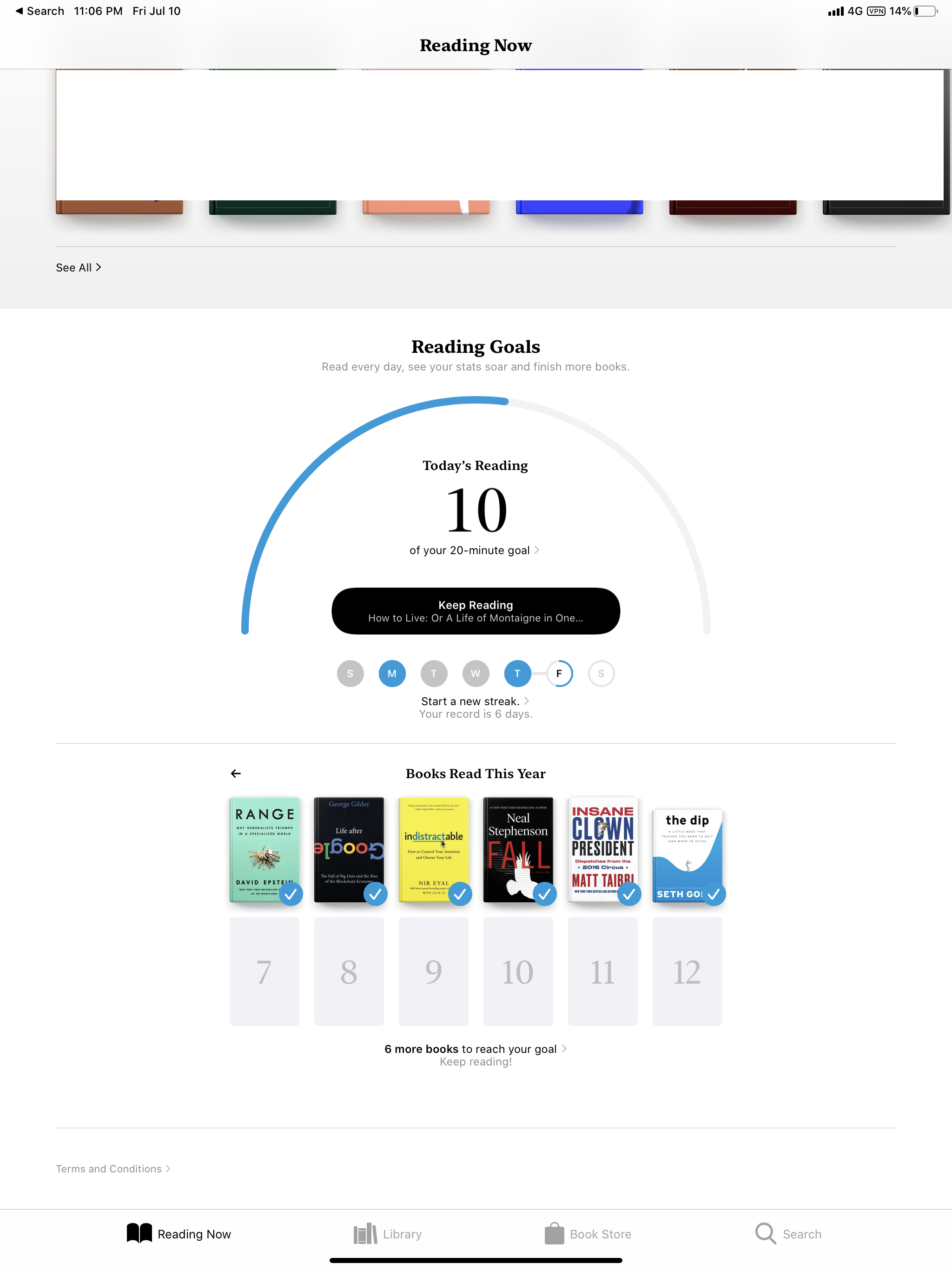
You can set a daily reading goal – I’ve set it to twenty minutes, even though I will get a little more done every day. The app then tracks this as you read over the day, and sends you a notification when you’re hit it… The app then logs streaks for the number of days that you’ve hit this goal. You can see this in the large screenshot at the top. For me, streaks are highly motivating.
This is the screenshot I was referring to. You can see progress towards a daily goal as well as the streak right below it.
If you want to build up a reading habit, this can be very helpful. You can set your daily reading goal to as low as you like – even the two minutes that the blog post talks about.
You can set a phone reminder that goes off in the morning, or when you’re winding down, to get your two minutes of reading done.
The Fitbit’s gentle nudge to walk at least 250 steps every hour is another example. Fitbit calls this Reminders to Move. 250 steps isn’t much, but if you do it during the course of a 8 hour workday it adds up to 2000 steps. And keeps you from sitting idle for extended periods of time.
I wish more apps were designed with healthy habit formation in mind as opposed to being heavily optimized for constant, mindless usage.
This article talks about the phenomenon of paid right-wing news:
Clients pay for certain “news” to be produced—and then it is, published on a normal-looking local news site, alongside countless innocuous stories produced by machines as camouflage.
But what’s more important is why these sites gain a veneer of legitimacy. They
[take] advantage of how profit-chasing has blown up the entire concept of “media literacy.” When your local paper’s website is as larded up with spammy-looking ad crud as an illegal Monday Night Football stream, these spare sites cannot possibly look any less “real.” And as newspapers die and people get more and more of their news from social media, fewer people recognize which news “brands” are supposed to be “trustworthy.”
The alternative to running ad-heavy websites is to charge for access. While many well-known publications have done so – NYT, WSJ, Bloomberg, FT, even WIRED – the paywall does mean fewer people end up reading articles on these sites. This puts them at a disadvantage to these pseudo-news websites, which rely neither exclusively on advertisements or paywall, but on their patrons whose views they publish as news. This breaking of the business-editorial wall is not luxury a serious publication can afford.
Wapo, New York times, NY Daily news, business insider, wired on and on and on, all these places used to be free and now I’m left with the freaking horrible terrible NY post.
See also: Our series on 21st Century Media, what it will look like, and its challenges
The results of a 12000-person survey conducted in April, on the effects of the lock-down that was – and is – imposed in many countries:
“The stay-at-home orders did result in one major health positive. Overall, healthy eating increased because we ate out less frequently. However, we snacked more. We got less exercise. We went to bed later and slept more poorly. Our anxiety levels doubled,”…
“Overall, people with obesity improved their diets the most. But they also experienced the sharpest declines in mental health and the highest incidence of weight gain,”
It’ll be interesting to see the results of the same survey conducted in October, at the time of this writing, half a year later. Many countries still have some form of a lock-down. Working from home has become normal for white-collar jobs. Consequently, companies have adjusted their cultures, not always explicitly. People have adjusted their days accordingly. Finally, several countries, notably in North America and Europe, are seeing a ‘second wave’ of Covid cases.
“As attention spans have shrunk, short, conversational, and highly visual research is more respectful of the reader’s time and that is the type of research we aim to provide,”
“I’d characterise our research as being of ‘higher nutritional value’, which means fewer words and more insights vs being full of ‘empty calories,’
This explains the fun and rather cheeky tone of its newsletter. It also explains the focus on bite-sized commentary and shareable infographics,
Credit for these numbers [640,000 subscribers] go also to the carefully crafted, irreverent headlines. “Bye-bye,” “no more startup drama pls,” and “this might anger you,” are a few examples of these headlines – the kinds that leave subscribers curious and wanting to click through.
A scammer can use the same tricks against you on your other accounts, like your Gmail. Such attacks are more common than you think. According to this BBC article from April, Google was blocking 100 million phishing emails a day.
What does a Gmail phishing attack look like?
Phishing techniques improve every day, and are quite sophisticated even today.
You could get an email that looks like it’s from Google, but is not, asking you to tap a button – it could say it’s for account maintenance, to accept new terms and conditions, to download a Google Doc someone’s shared with you or a number of other things.
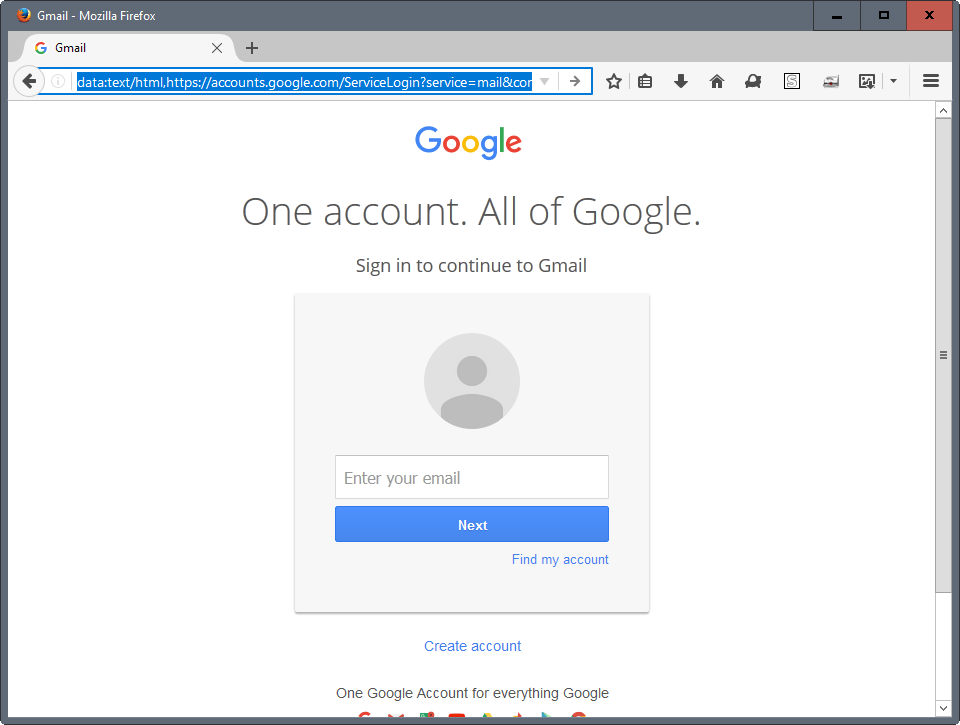
When you click on the button in the email, you get a screen that looks like this:
This screen looks like it’s from Google, but it isn’t. The only way to tell is by carefully looking at the URL (the web address in the bar). For most of us who are perennially distracted, it’s really hard to tell the difference.
You enter your username and your password, but it’s read by the attacker instead of by Google. You have lost control of your account. Your attacker can now use Google’s security features against you and log you out – from your browser, your Gmail app, Google Docs – everything.
If someone gets access to your Gmail account, or any other email account like Yahoo, Outlook or iCloud, they could then get into other your other accounts – Instagram, Facebook, Snapchat – by sending a password reset email to that email account, and then changing the password.
How do I protect Gmail – and my other accounts?
Gmail has support for two-factor-authentication, that is, support for a second layer of protection beyond your password/OTP.
This second layer is a six-digit code that you enter after you have entered your email address and password on a new computer/app install. So you see two login screens, one after another, instead of one.
As we will see in detail below, the scammer may be able to trick you into giving up your Gmail password, but it’s really hard for them to be able to get your two-factor code.
Not just Gmail/Google, here is a list of common accounts that you can and should enable this two-factor-authentication for:
Gmail (or Google) account
Apple iCloud account
Facebook
Instagram
Snapchat
Linkedin
Twitter
Dropbox
But, you ask, how is it practical to remember six-digit codes for all these accounts? Surely it isn’t wise to use a single code for all these accounts.
That’s right. In fact, you don’t need to remember any of these codes at all.
You will use a new app, Authy, to generate new six-digit codes whenever you log into Gmail or these other accounts from a new phone or computer.
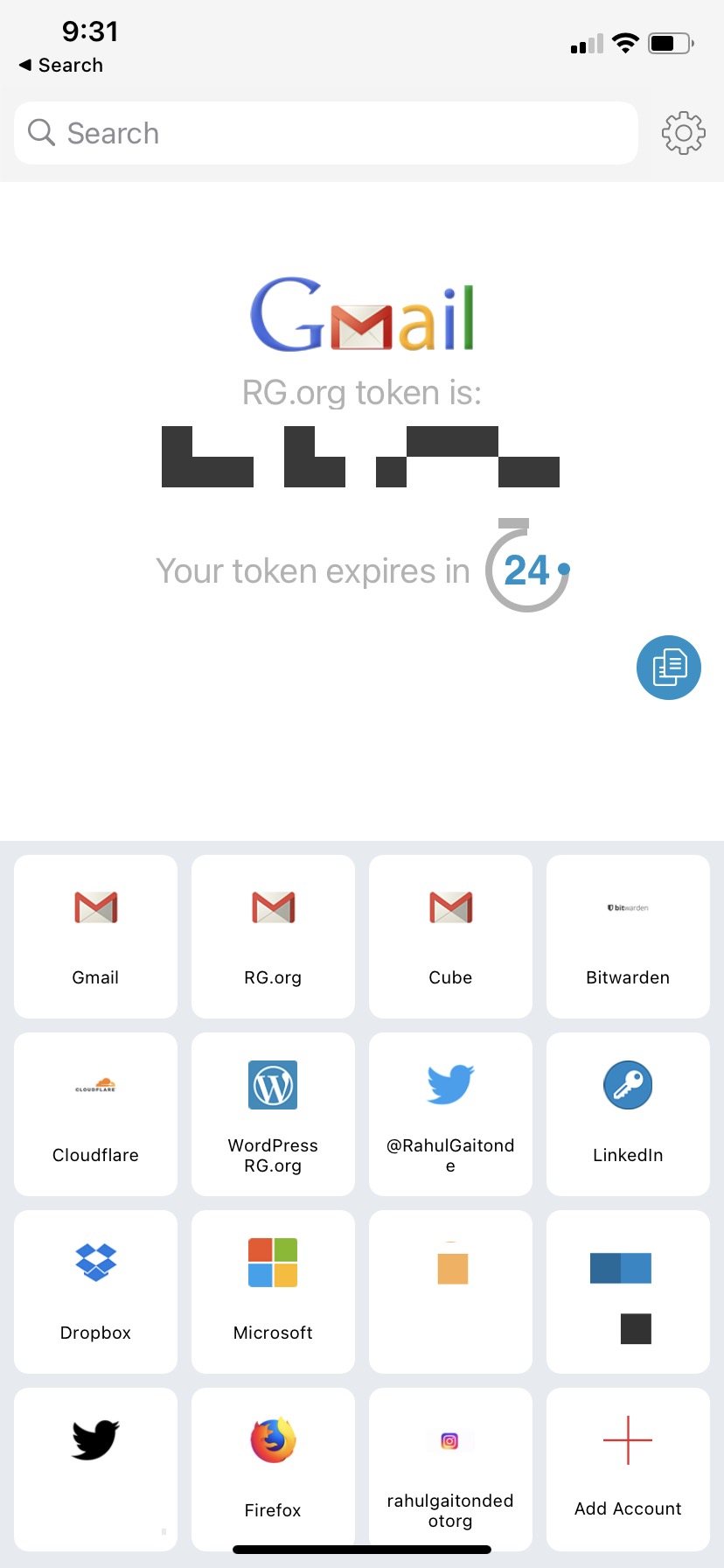
Authy is a dedicated two-factor-authentication app (now owned by the Internet infrastructure company Twilio.) You can see a screenshot of my own Authy app with two-factor set up for several accounts.
You can see that Authy’s auto-generated a code for one of my accounts which I can just type when I login. So I get the full benefit of this second layer of protection without remembering codes for any of these accounts.
You can install Authy on more than one device – say your iPhone and iPad. You can even install it on your desktop computers. You secure the app itself with an Authy password – which is the only password you need to remember (or store in your password manager).
Setting up your Gmail account with two-factor protection using Authy
Keep the following handy: the Gmail app on your phone. And a laptop browser window.
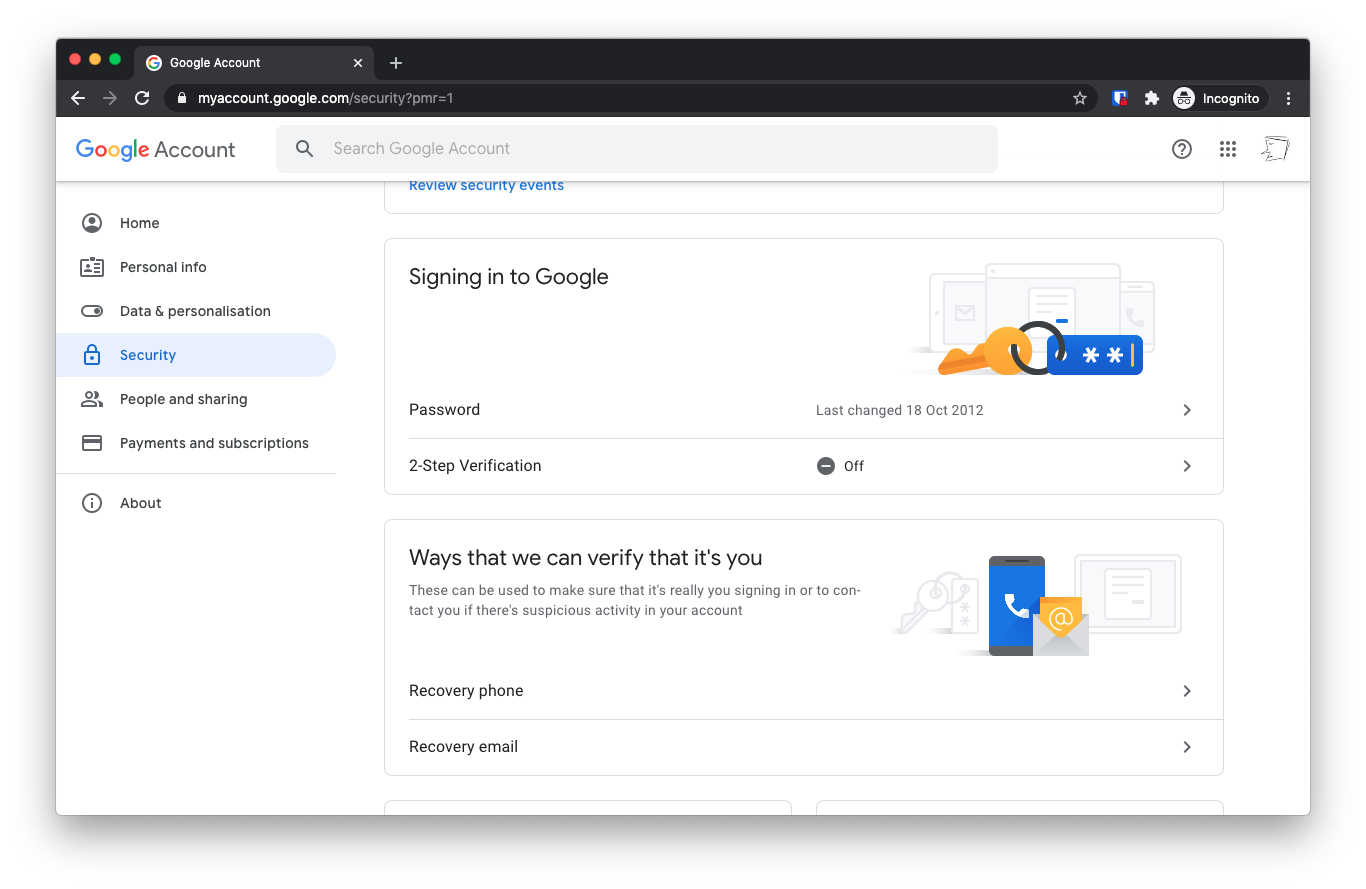
Now. Login to your Google Account Management page at accounts.google.com. Tap the “Security” section on the left. Scroll down to the “Signing in to Google?” section. You’ll see that “2-step verification’ is off. Click it.
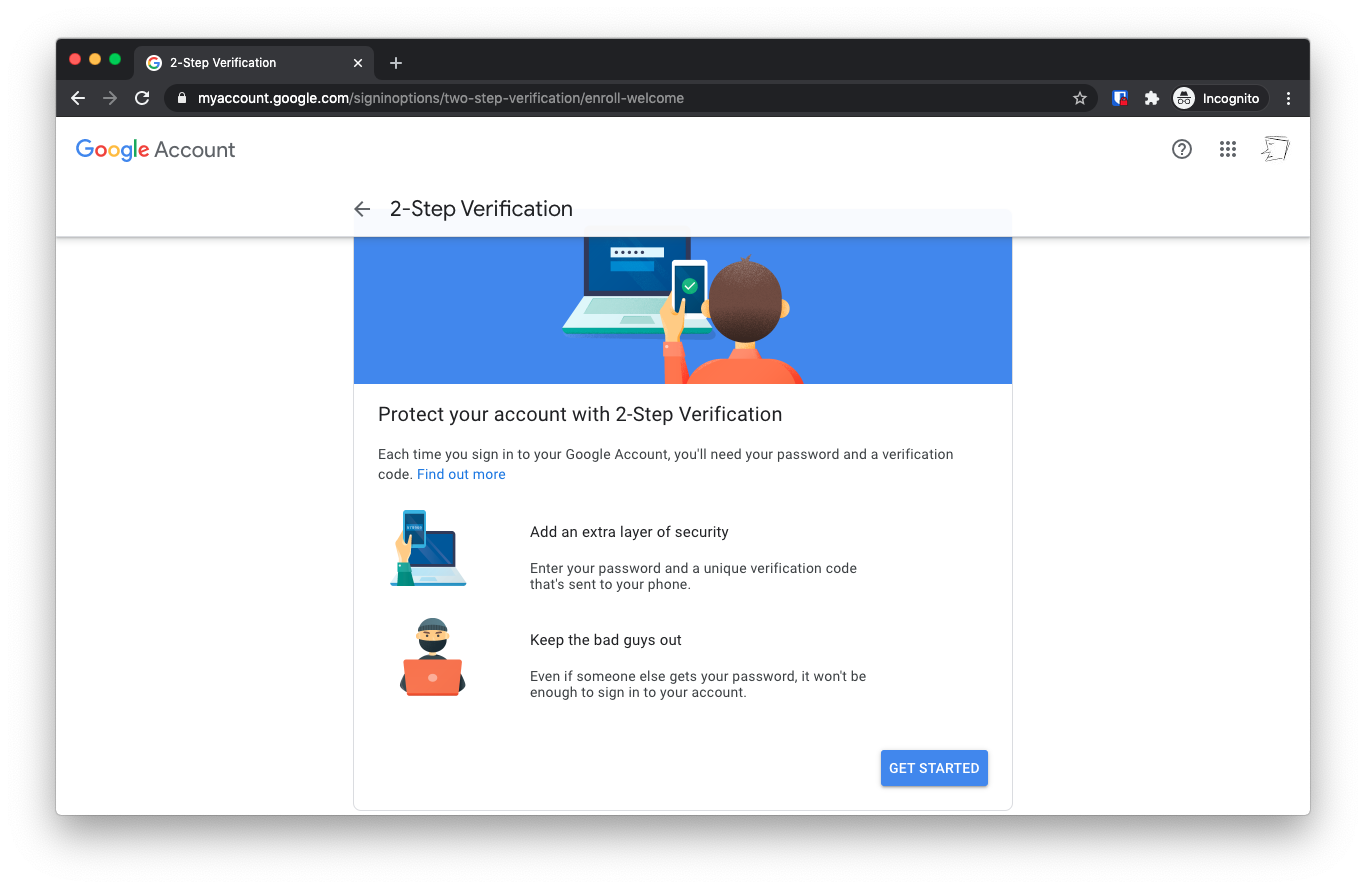
Now you’ll go through a simple wizard to set up your two-step verification. Tap Next on the Introduction screen:
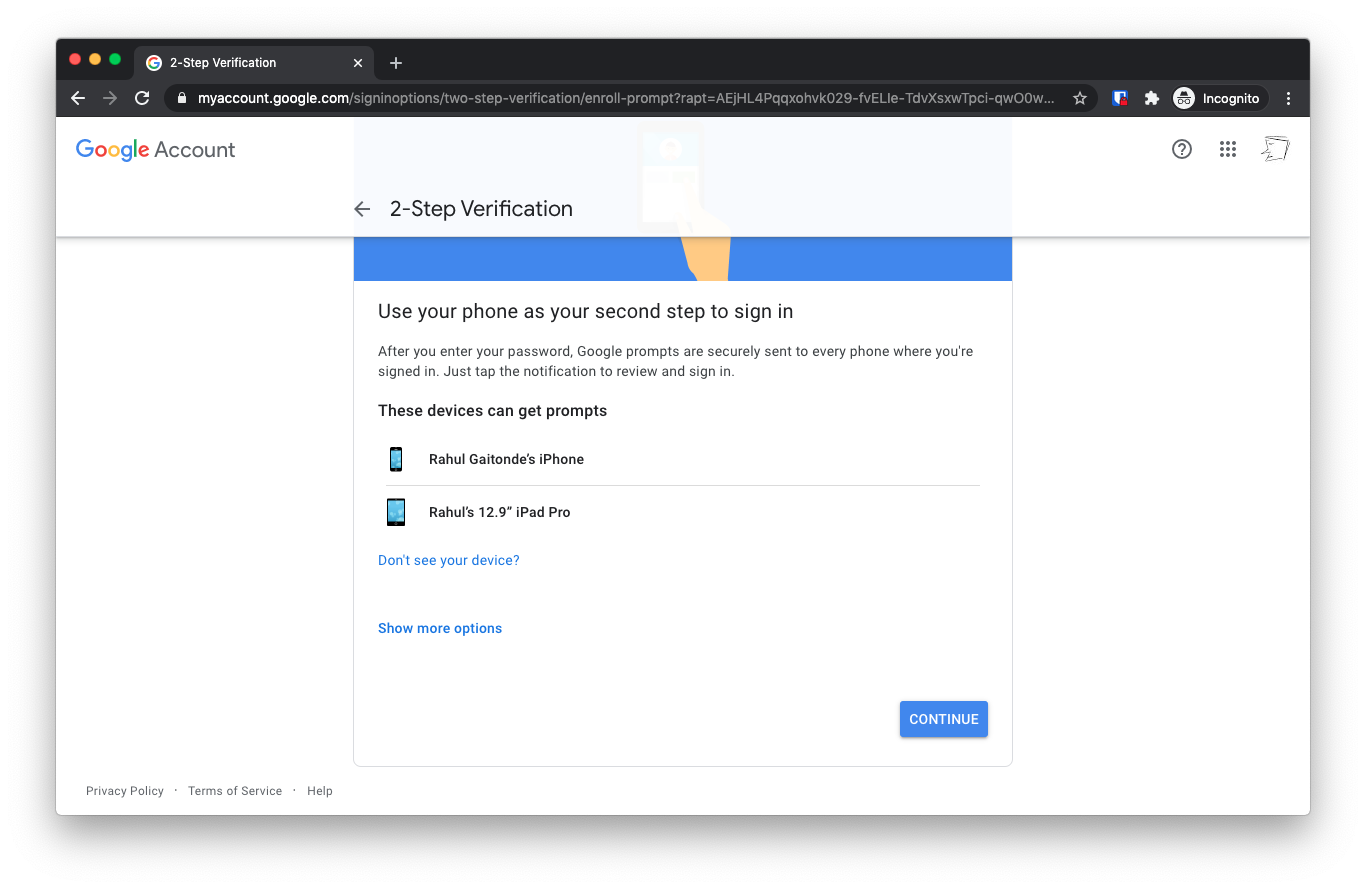
Tap “Continue” on the next screen, titled “Use your phone as your second step to sign in”
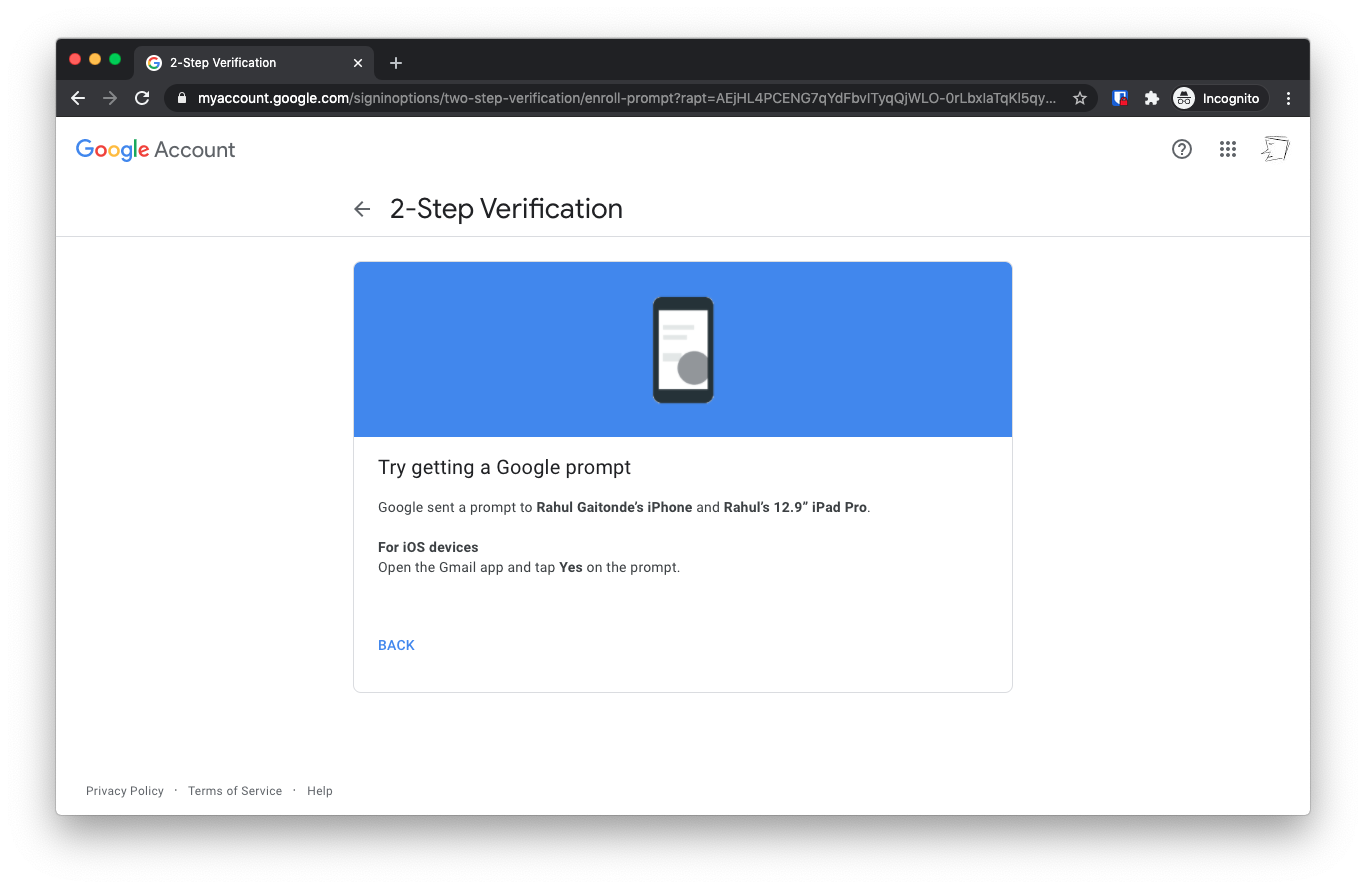
Now on the next screen, the wizard says that Google has sent a notification to your Gmail app.
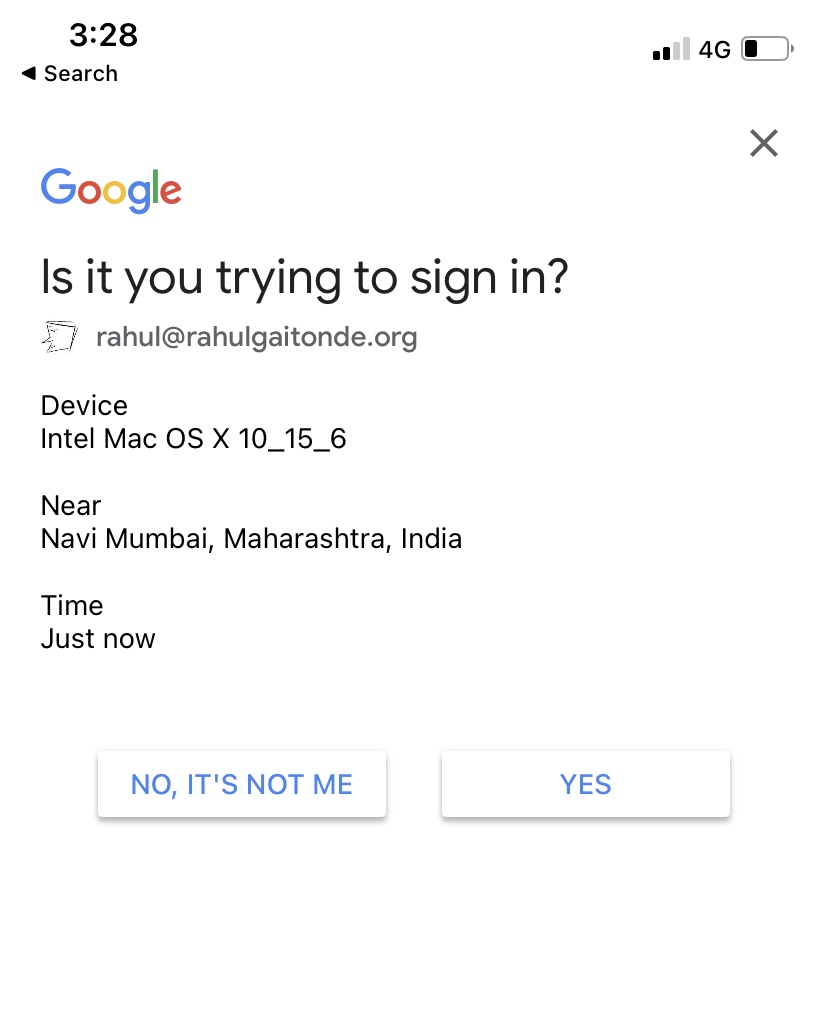
Launch the Gmail app on your phone and instead of your inbox, you’ll see a login notification. Tap Yes.
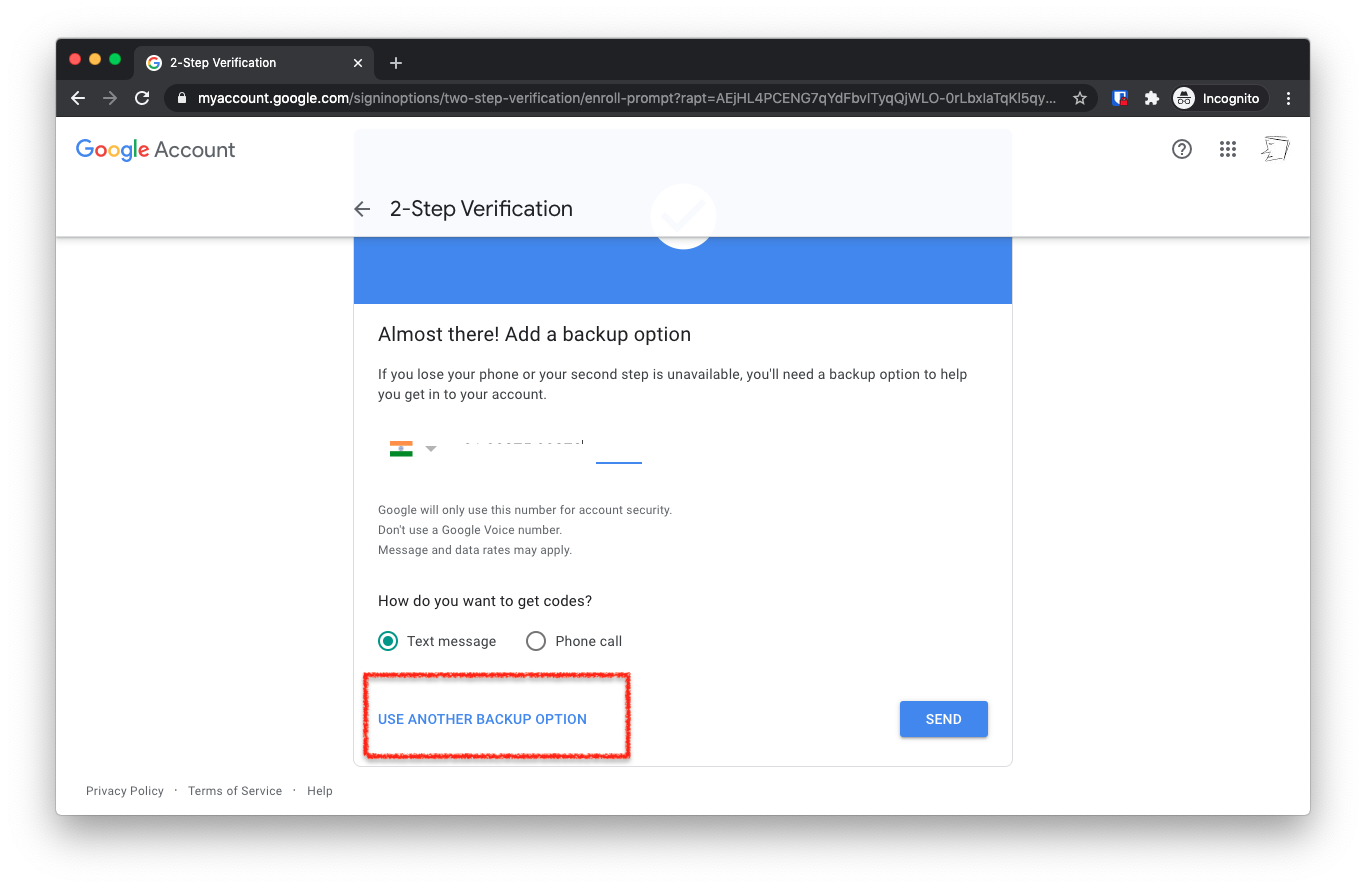
On the next screen, “Backup”, tap “Use another backup option”
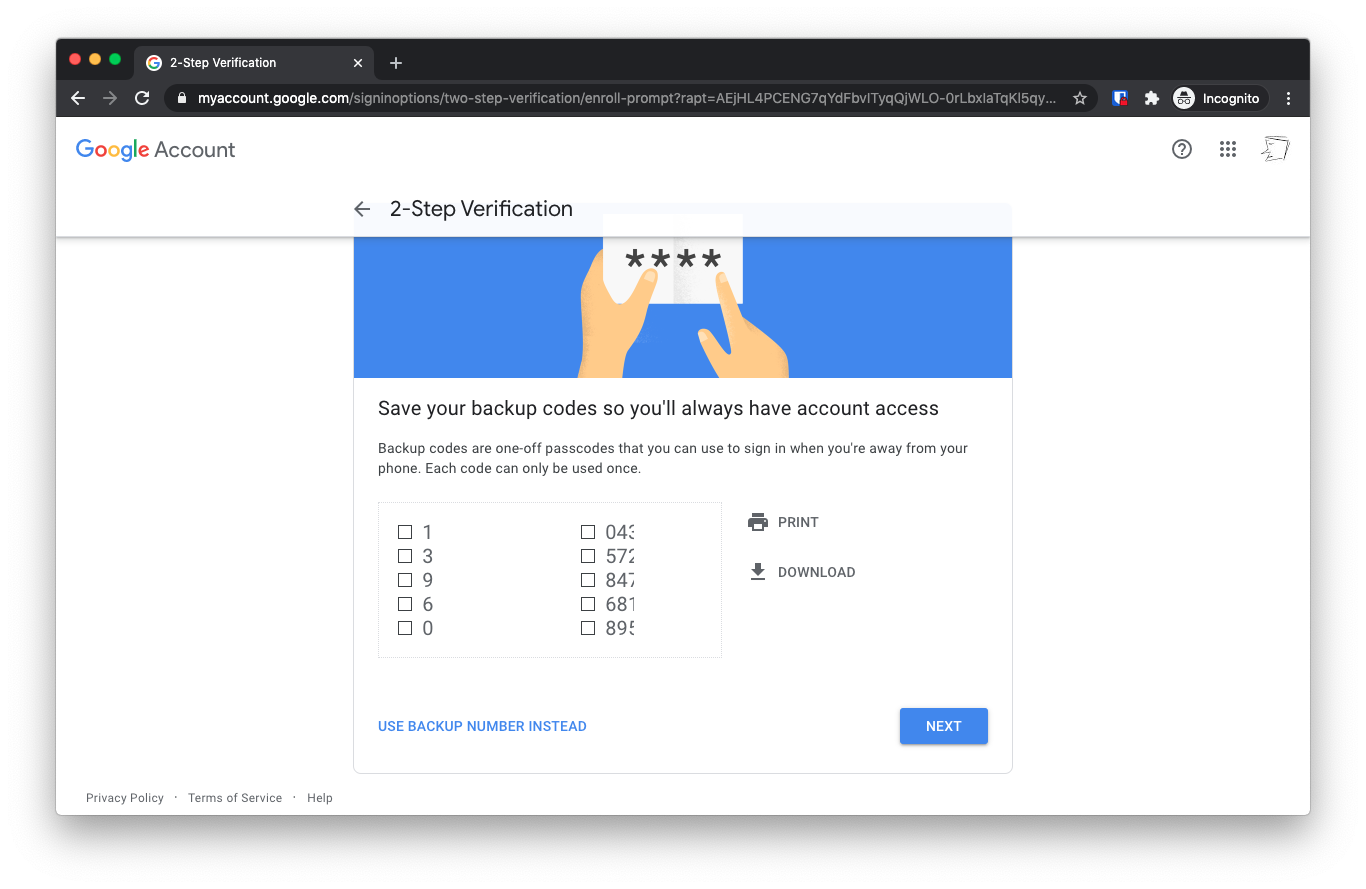
You’ll see a bunch of recovery codes. Tap “Download”. Rename the text file to “Gmail Recovery Codes” and save the file in your My Documents folder.
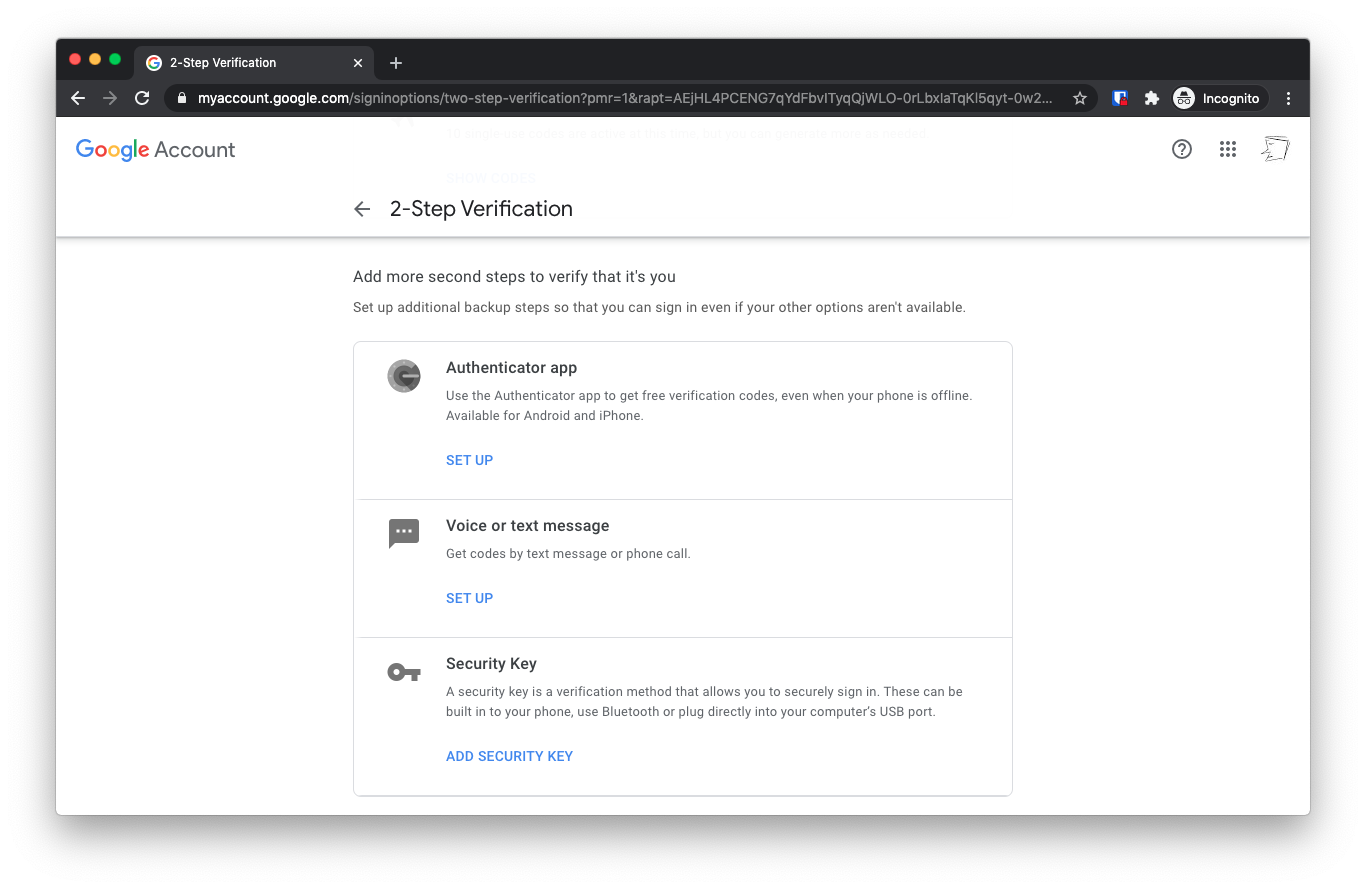
Just one more step: On the next screen, under the “Add more second steps to verify it’s you”, tap the “Authenticator App” section.
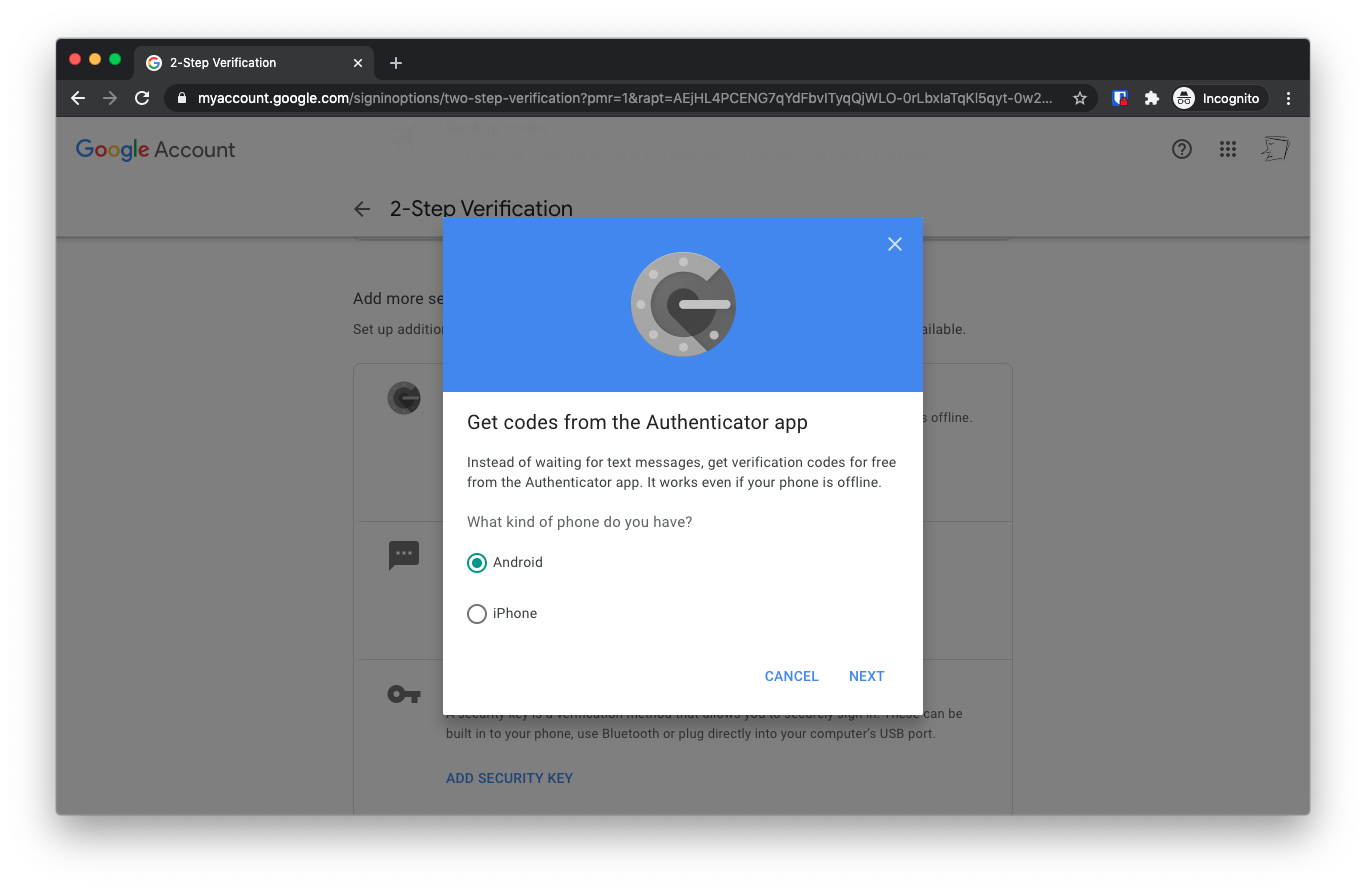
On the next screen, choose whether you have an iPhone or an Android phone. I picked iPhone, but the steps are the same.
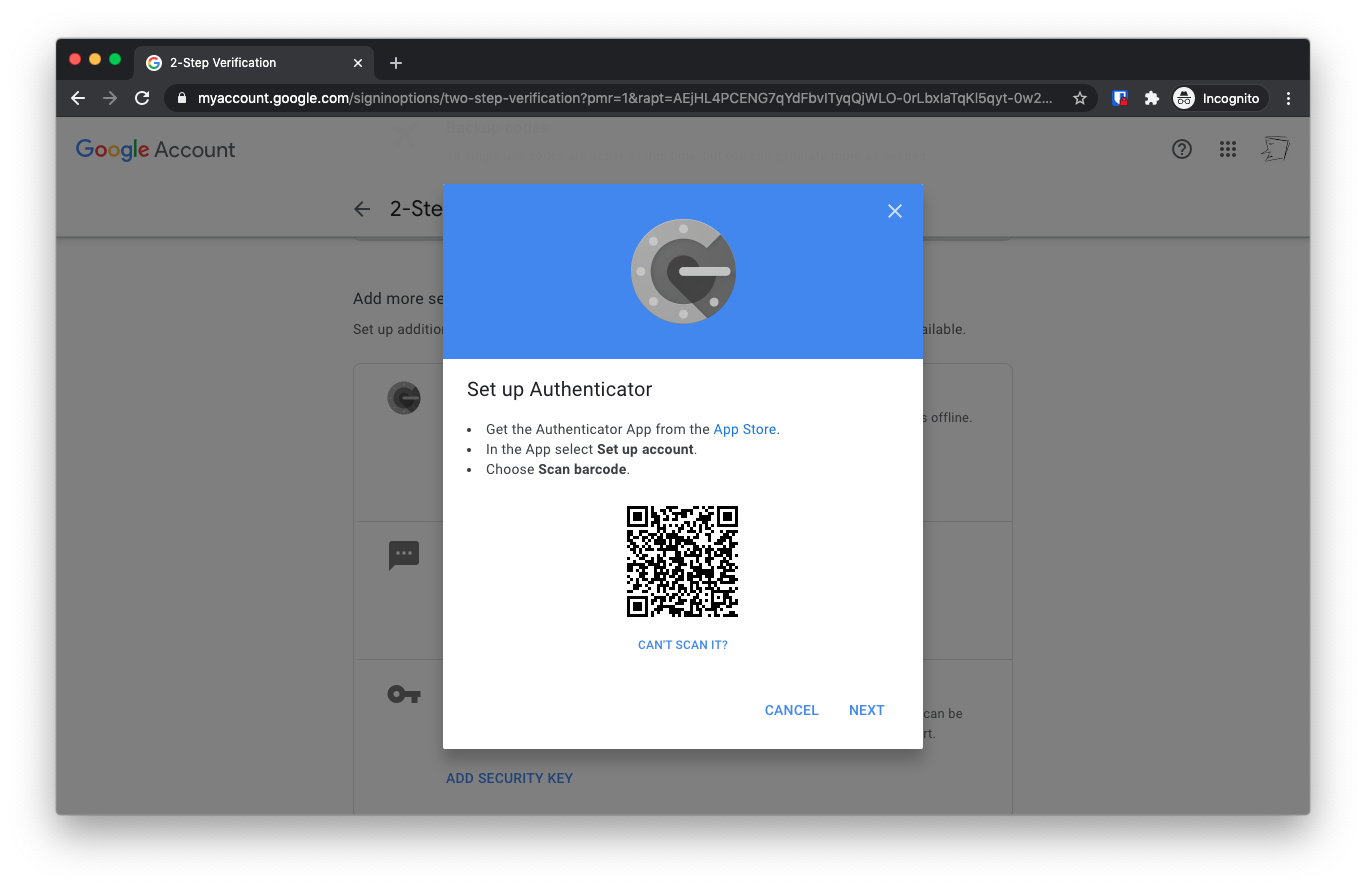
On the next screen, you’ll see a QR Code displayed.
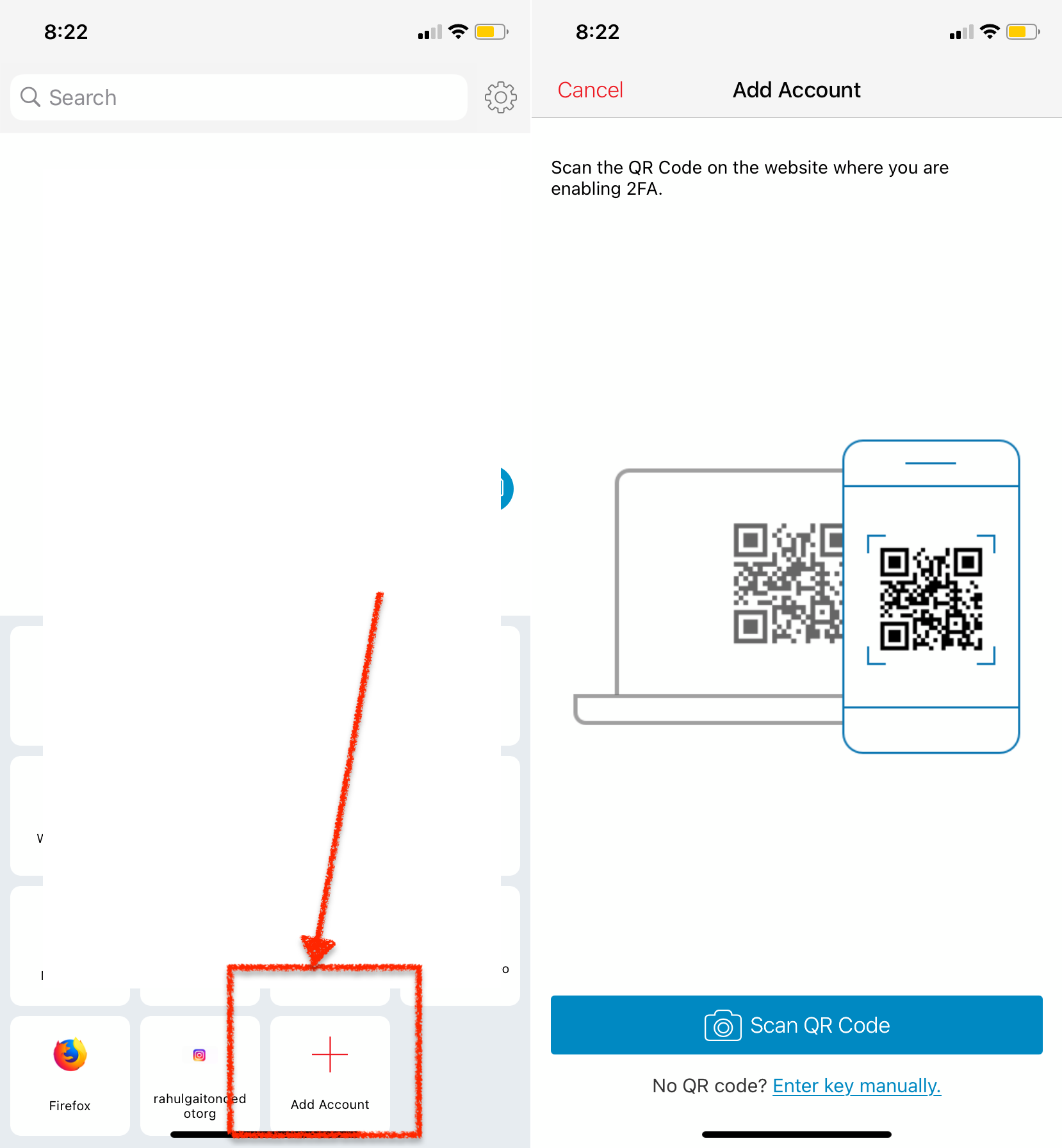
Now on your phone, open the Authy app. Tap “Add Account” and pick “QR Code”.
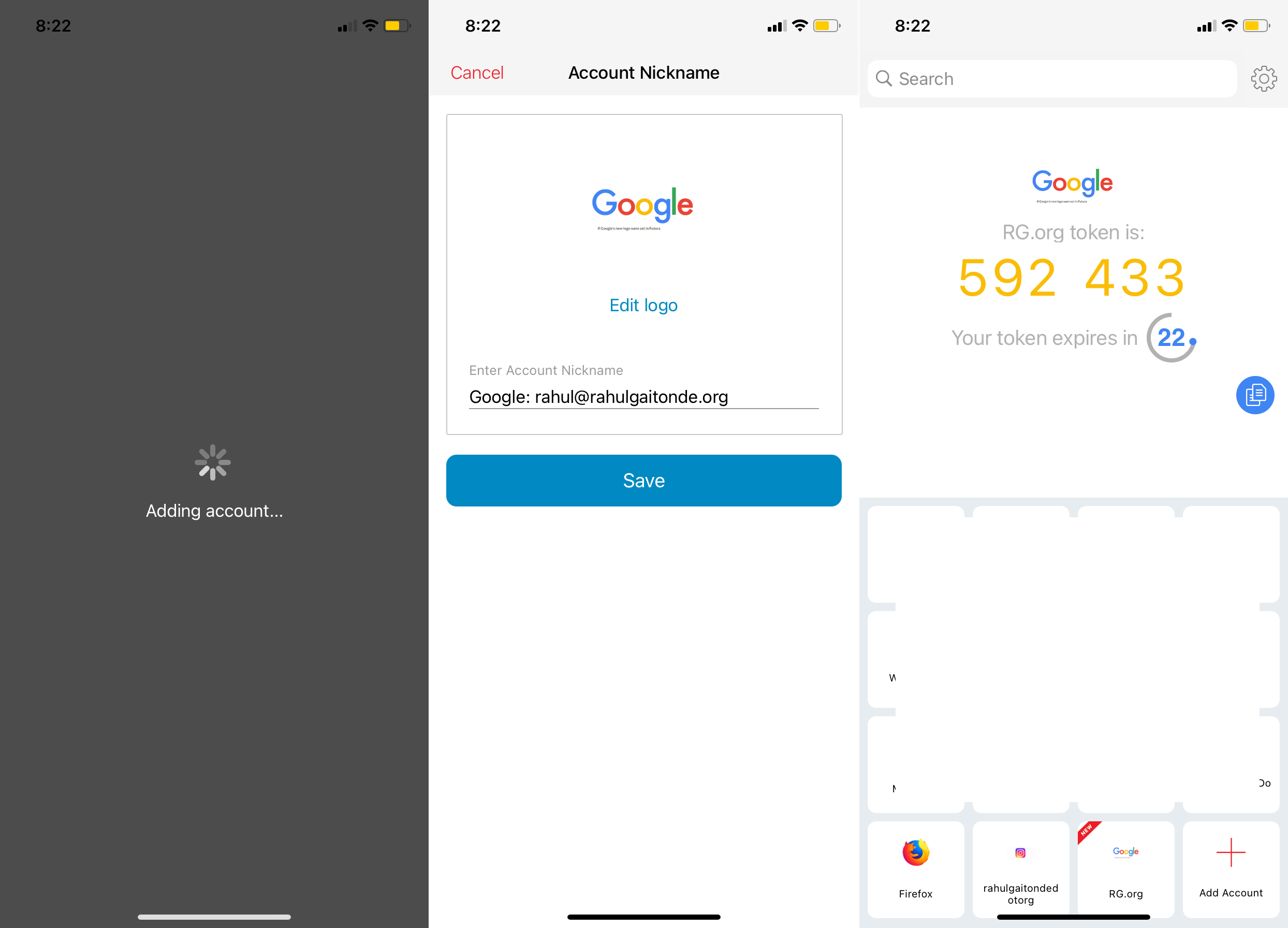
Scan the QR code on your laptop screen. Your Authy app will immediately identify and add the account. And start displaying six digit codes.
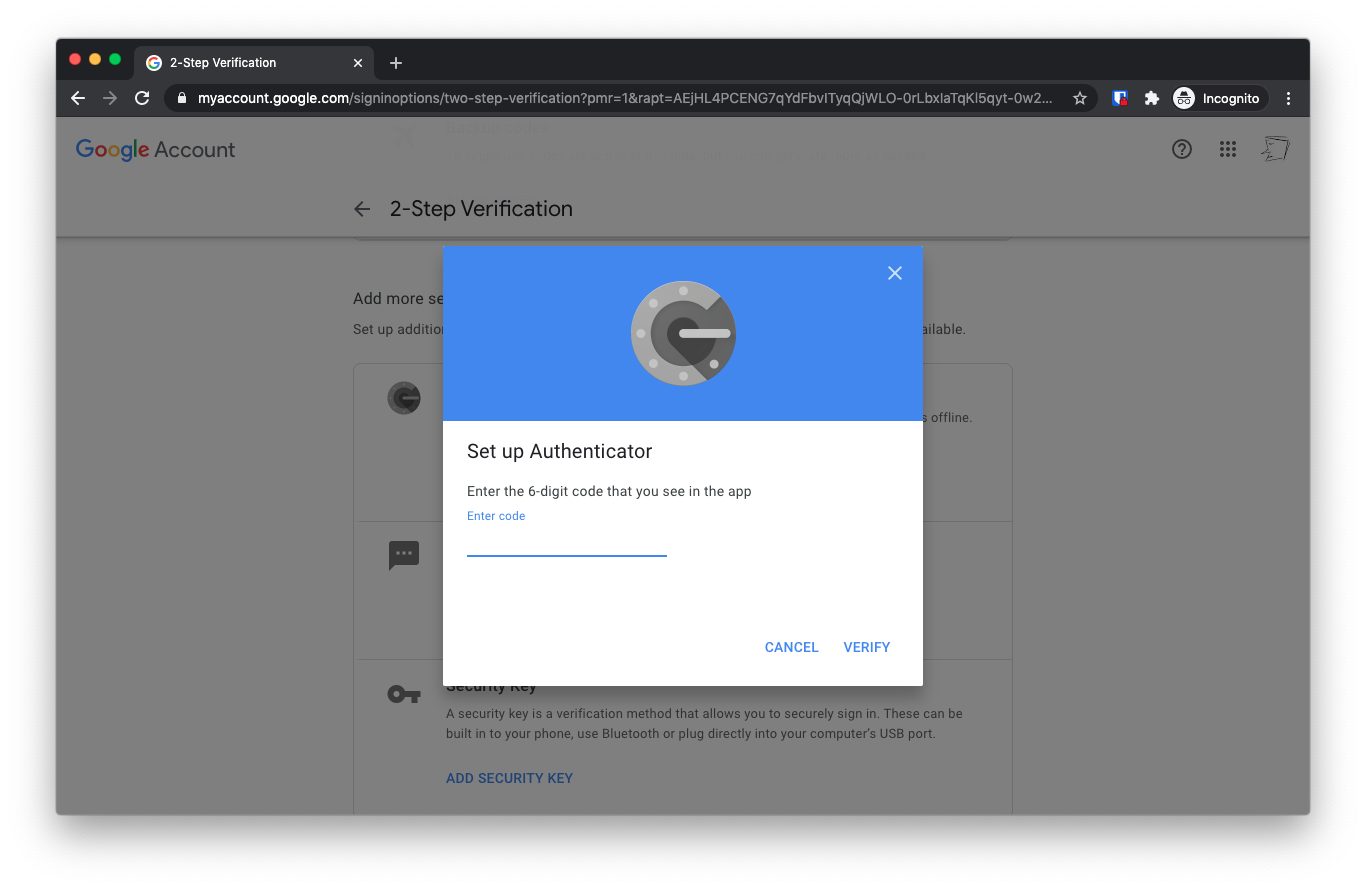
The screen on your browser will automatically refresh to ask for a six digit code. Enter the six digit code that’s displayed on your phone’s Authy screen.
You’re done! Now, when you sign in to Google or Gmail or Google Drive on a new browser on your laptop, or a new app install on your phone, you’ll enter both your username and password, and then the latest six-digit code on your Authy app. That’s it!
Logging into Gmail with your new, secure two-step flow
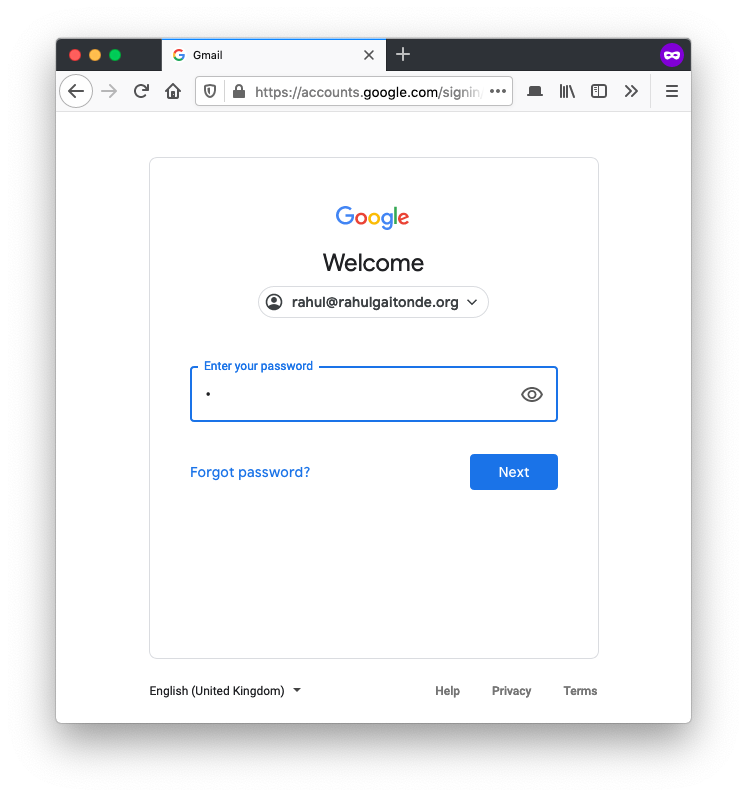
Here is what your new login looks like. First, your user name and password as usual:
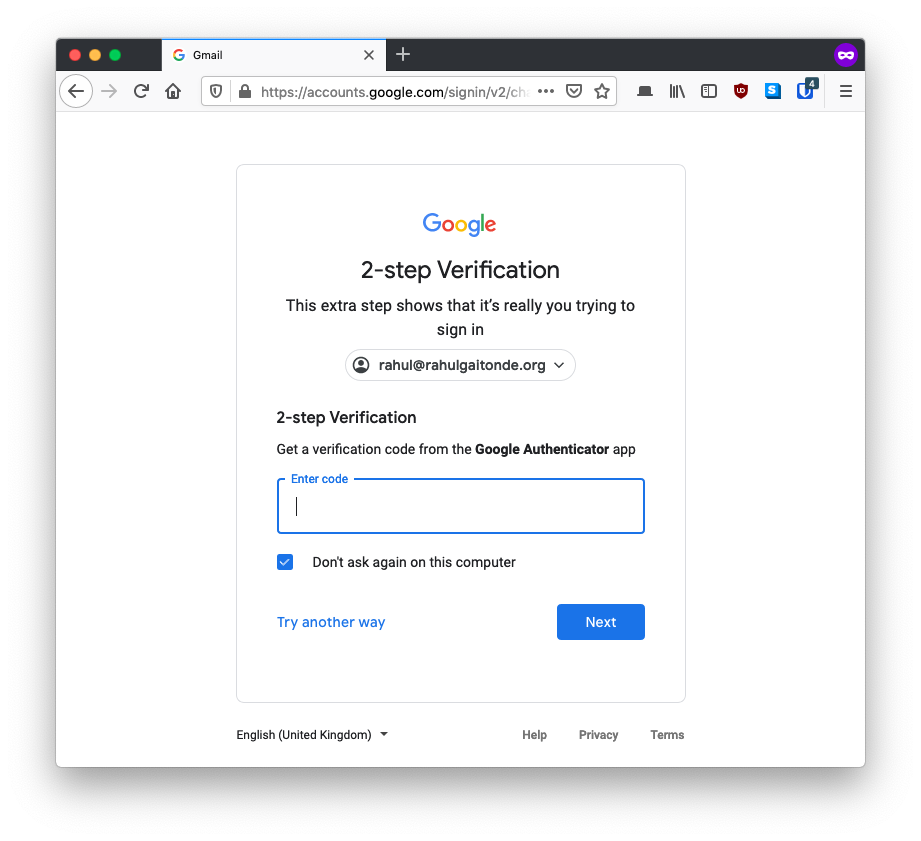
Your account’s login screen will then ask you for your second-factor code.
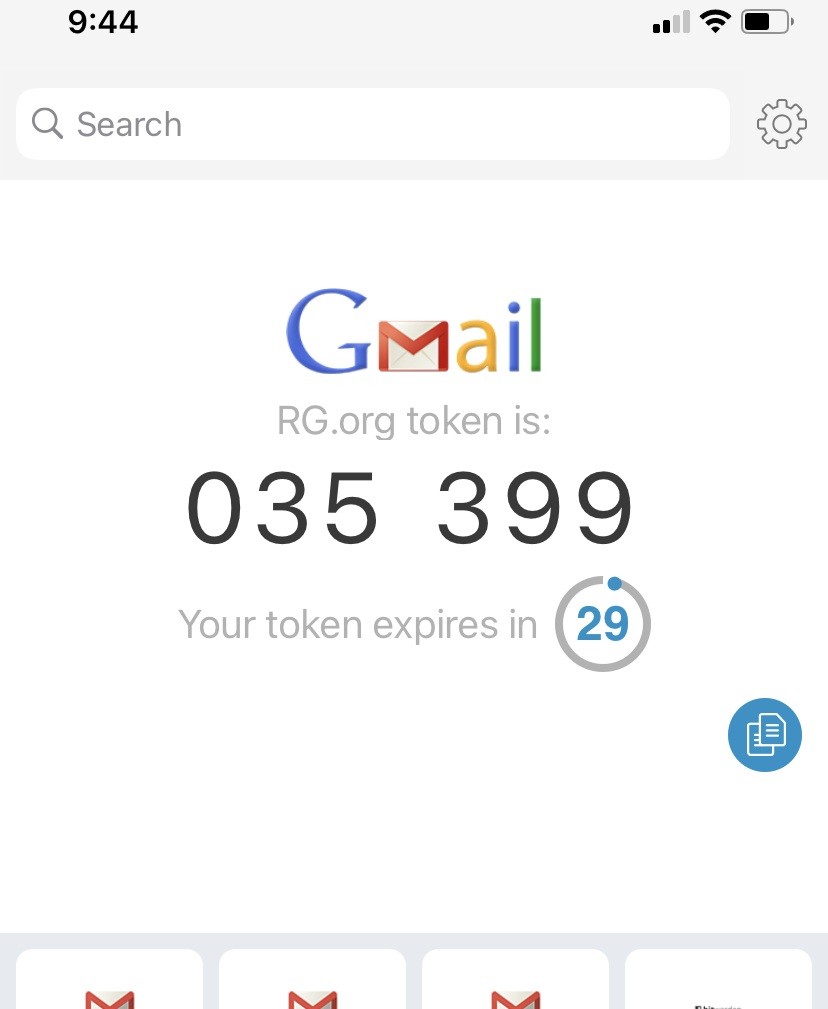
At this point, you look for the code in the Authy app. Authy will generate a code that is valid for a maximum of 30 seconds.
Type this code in the login screen and you’re done!
Why two-factor authentication protects your Gmail account
Let’s go back to the example at the beginning of the post. We saw how you could receive an email that looked very much like it was from Google. It has a link for you to click – the email could say that it was for account management, reviewing and accepting new terms and conditions, or a number of other things.
You don’t review the sender’s email address, which Gmail and other email apps usually collapse, and you need to tap a button to reveal. You think it’s a legitimate email, click on the link, and are taken to a very realistic-looking Google authentication page, asking you for your email address and password, which you enter.
At this point, because the web pages were hosted by a scammer and not by Google, they now have your password. They can now log into Gmail – or your Google Account and prevent you from logging back in.
But if you had 2FA set up, once the scammer entered your email and password into the Google login screen, they would be asked for your second-factor code. They don’t have it. They have no way of going back to you and asking you for another code.
But could they not have asked me for the second-factor code when they displayed the fake pages? Here’s the problem for them: they have no way of knowing in advance if you have two-factor authentication enabled on your account or not.
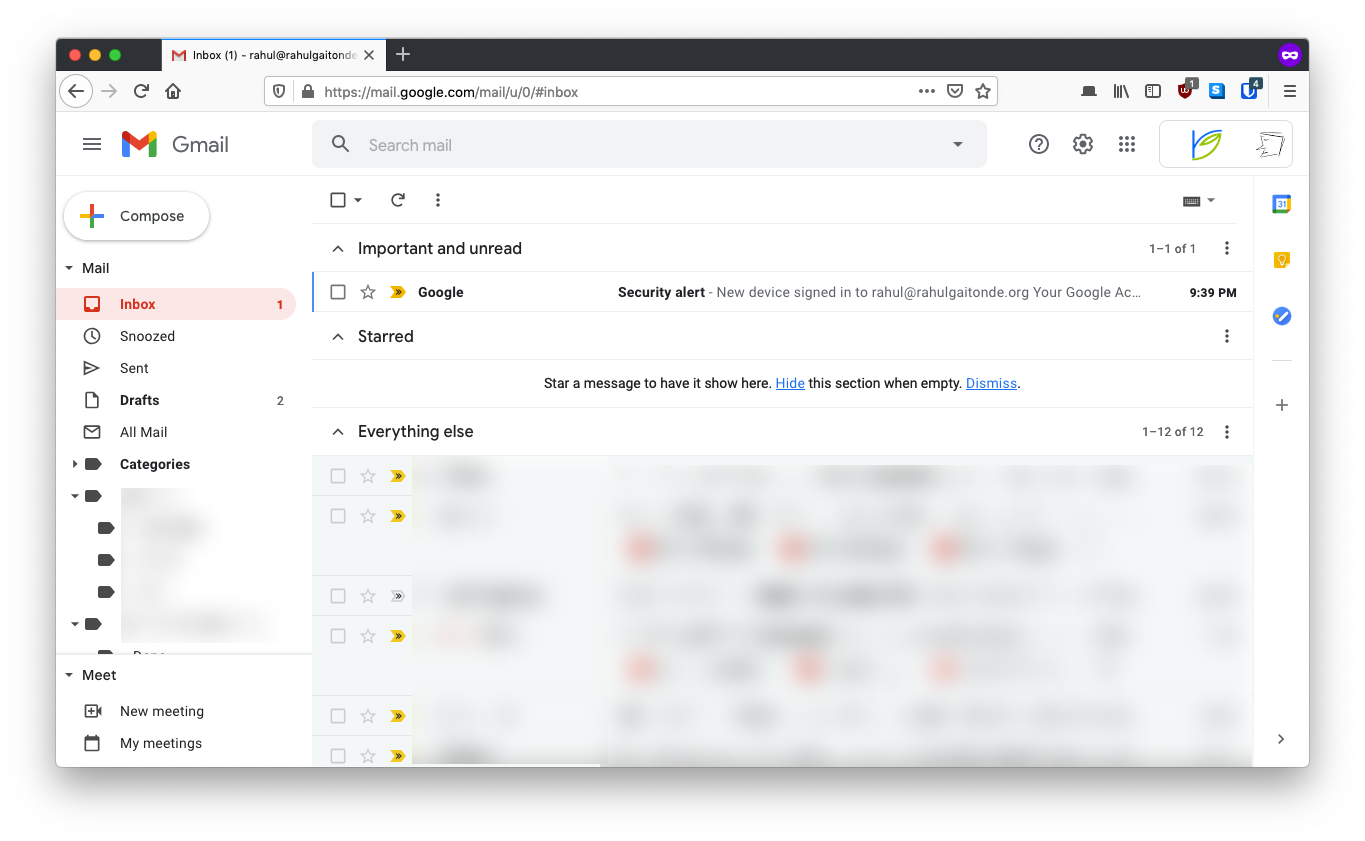
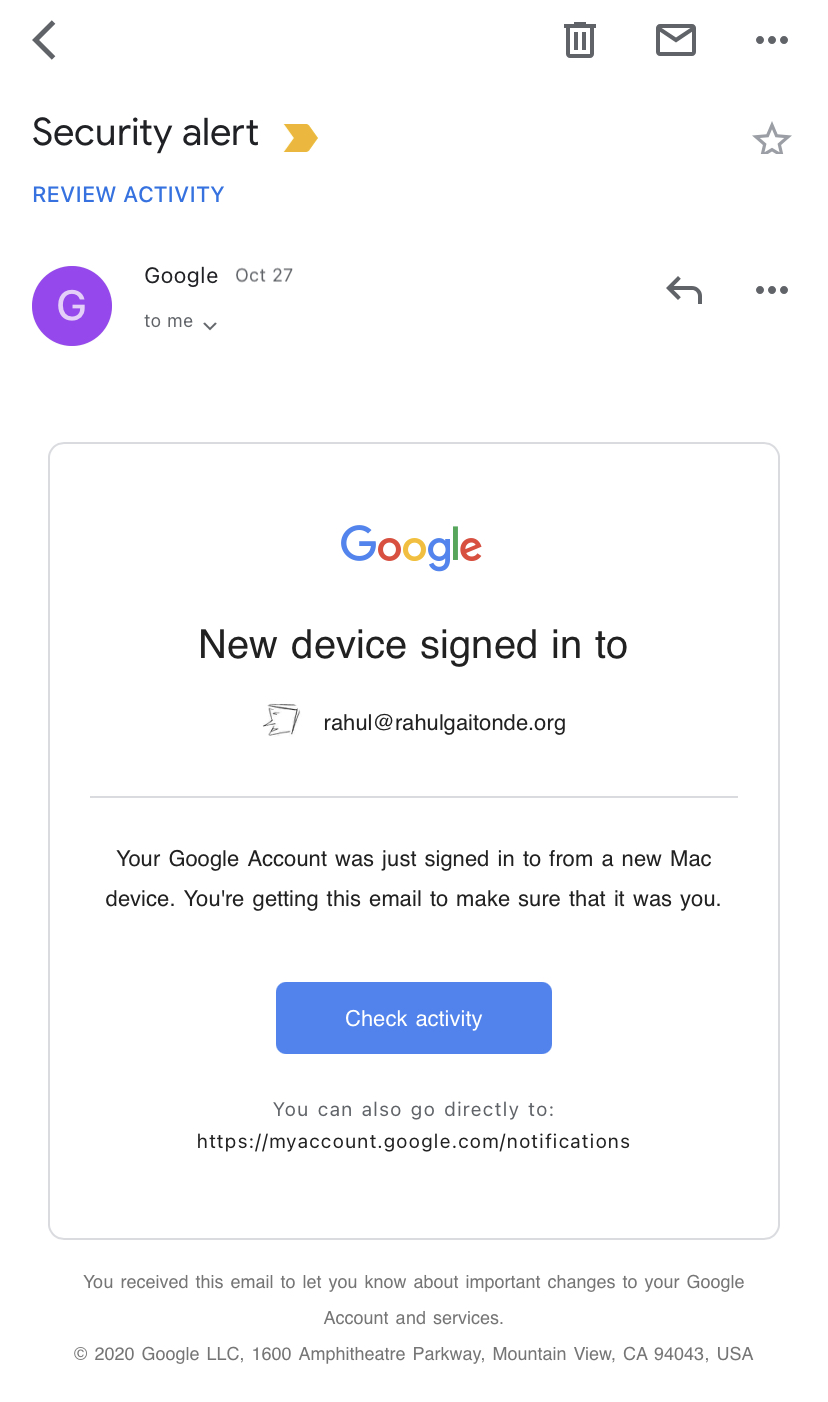
Finally, when they attempt to log in using your (scammed) password, you’ll get an email immediately from Google, which looks like this:
You’ve probably seen this email often – but don’t ignore it!
You will know immediately that something is wrong, since this was not you. Once you know this, you can – and should – change your password right away.
(You’d get this email even if you did not have 2FA setup, but by that time it’d be too late, since the attacker would have logged in to your account).
Protecting from really malicious attackers
But what if the scammer was someone who knew you, who is targeting you specifically, who knew – somehow – that you have two-factor turned on, and custom-built a two-factor flow to phish you? A couple of things:
One, your two-factor code is only valid for 30-second intervals. Subtract from that the time it takes for you to look at the code, memorize it, switch back to the login screen, type it (or, if you copied it, then paste it), and tap next. The attacker now needs to copy that code from their malicious code into the Google login screen they’re using to get into your account within whatever few seconds are left. It’s not impossible, but it’s really hard, and even harder to get right in the one shot that they have.
(And it’s not like the 30 second countdown starts when you open the Authy app. Try it – you could well open the app midway through a 30-second cycle, so the time the attacker has is even less).
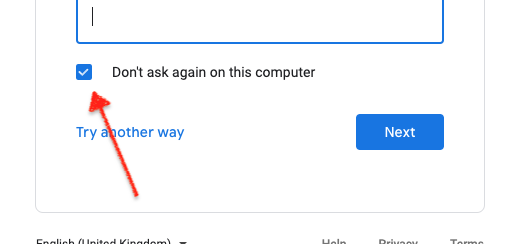
Two, when you log in with your two factor code on any browser, select the ‘Don’t ask again on this computer’ box on the two-factor screen:
Why would you want to tell the browser to bypass the second factor? Because access to your browser is safe – since it’s on your password-protected phone or computer – and now you can distinguish between a trusted and an untrusted page. How?
Let’s go back to the truly malicious attacker, who has found out beforehand – somehow – that you have set up two-factor authentication, and has created a fake Google-like flow that asked you for your second-factor code. You are fooled by the genuine-looking email, and you click on the link. Your browser opens. You are further fooled by the genuine-looking login page, so you enter your username and password. Now you see a genuine-looking second-factor page.
At this point, you should immediately be suspicious – you’ve explicitly specified to this browser that you don’t want Google to ask you for a second factor code. That should tell you it’s not a genuine web page, and you can pause and check the email and the login page are genuine.
Links to set up two-factor authentication for Instagram, Facebook and other social media
Authy has helpful guides with steps and screenshots for setting up 2FA for many common services. Everything above on how 2FA protects your Gmail account is applicable for all the services below.
If you own an iPhone, Mac or iPad, you should also turn on two-factor authentication for your Apple iCloud account using these instructions. The only difference is that you don’t need to use Authy. Apple will send the second-factor code to one of your devices as a notification.
Remember
In each case, choose to use an ‘authentication app’ over using ‘SMS’. Add the account to Authy in the same way as in the Gmail example above.
In each case, save any recovery codes that are displayed on screen. In the rare case that you are locked out of your Authy account AND need to use your second factor for one of your accounts, you can use one of these recovery codes to log in.
So. I hope this gives you a good idea of not just the what, but also the why and how of protecting your accounts with two factor authentication.
If more of us do this, and spread the word, we can defeat phishers and scammers – something unimaginable today.
Appendix: questions I usually get about two-factor authentication
Why not have my second factor sent to me over SMS?Why bother with a whole new app?
After all, this is how the “3D secure” protection works on credit card payments. Your credit card number and expiry are like your username, your CVV is your password, and then the SMS you receive from Visa or Mastercard or American Express or RuPay is your second factor.
The problem is that SMS as second factor is known to be insecure. Motivated attackers have been able to take control of your mobile number itself using a technique commonly known as SIM swap. After such an attack, your SMSes are now sent to their phone instead of yours. This 2020 CNET article describes this method:
Hackers have been able to trick carriers into porting a phone number to a new device in a move called a SIM swap. It could be as easy as knowing your phone number and the last four digits of your Social Security number, data that tends to get leaked from time to time from banks and large corporations. Once a hacker has redirected your phone number, they no longer need your physical phone in order to gain access to your 2FA codes.
Positive Technologies was able to hijack the text messages using its own research tool, which exploits weaknesses in the cellular network to intercept text messages in transit. Known as the SS7 network, that network is shared by every telecom to manage calls and texts between phone numbers. There are a number of known SS7 vulnerabilities, and while access to the SS7 network is theoretically restricted to telecom companies, hijacking services are frequently available on criminal marketplaces.
As of today, it’s unlikely that a casual attacker will resort to SIM swapping or an SS7 attack. But don’t discount malicious attackers – ex employees/teammates, a relationship that ended badly, a competitor, or someone who values access to your email/social media to get info about someone you know.
Why use two-factor codes instead of Google’s default notification system?
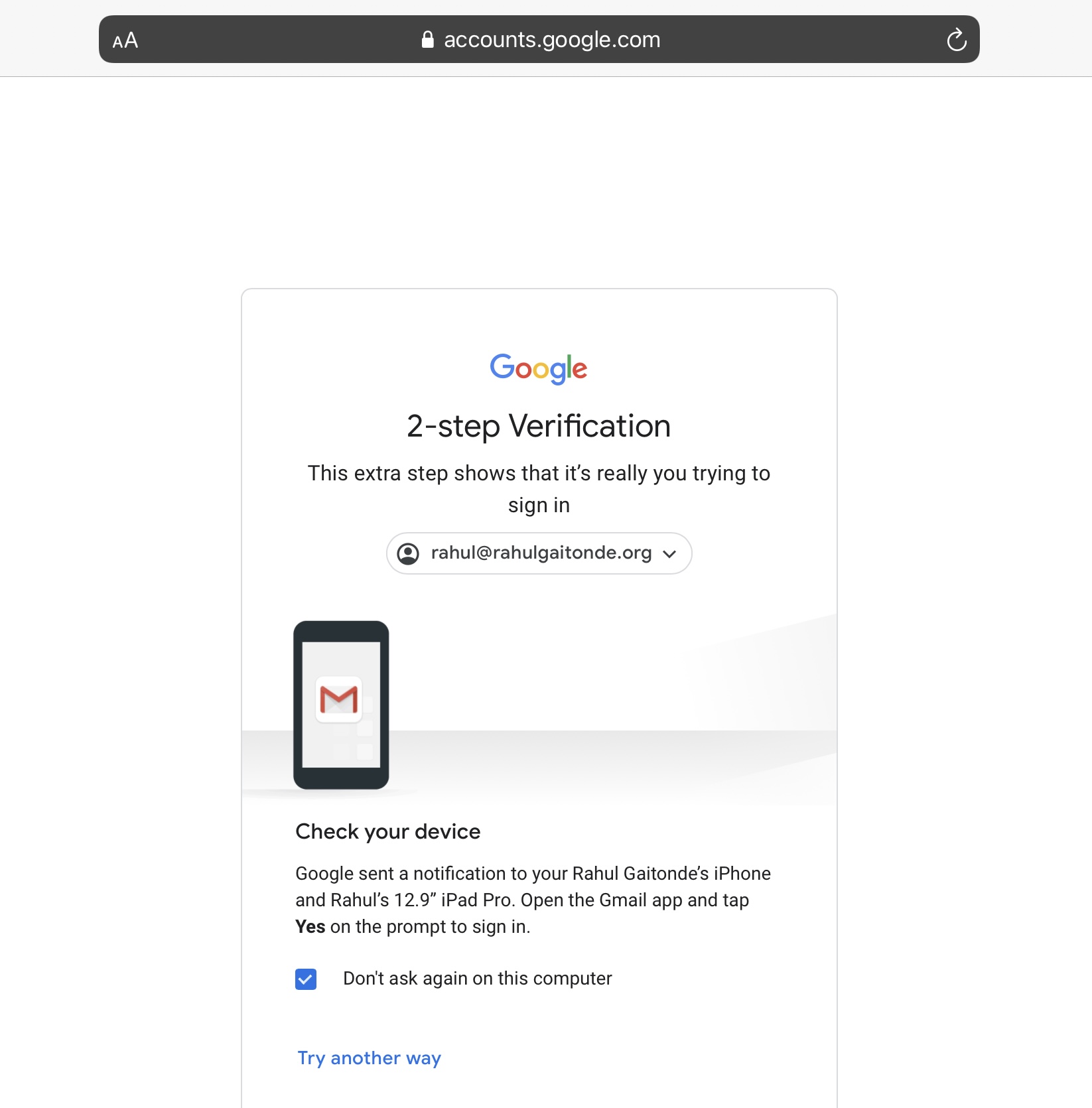
Google today pushes you to use its notification system as your second factor. This doesn’t require you to copy and paste time-sensitive six digits codes, ostensibly making your second factor login experience simpler. This is how it looks. After you enter your email and password, you see this screen:
If you open your Gmail app, it’ll open to this screen:
If you tap yes, your browser proceeds to your Gmail/Google Drive/whatever Google service you were logging into. This works across devices – you could be logging in on your laptop and tap Yes in the Gmail app on your phone.
Clearly there are advantages.
One, you’re not reading and re-typing six digit codes, so there’s no chance you’ll mis-type anything.
Two, it’s a single tap, so it’s much faster – there is no chance that the code will have expired by the time you paste it.
Three, the notification shows you the location of where the login is taking place. If your attacker isn’t in the same city as you, this is an immediate sign something is wrong. Same with the device. If you don’t own a Mac, and the notification shows that the login is taking place on one (like in the screenshot), you’re being phished.
Four, the 2-step verification screen lists the names of your device(s) that have Gmail installed. You can see that the text in the screenshot says “Google has sent a notification to your Rahul Gaitonde’s iPhone and Rahul’s 12.9” iPad Pro”. It’s almost impossible for an attacker to know this level of detail about you, so the fake two-factor screen that they present to you will almost certainly not name your devices.
So why should you use the Authy app instead of this seemingly elegant method?
One, everything we’ve seen above only applies to your Google account. To secure your Instagram, Facebook, Snapchat, Uber and other accounts, you’re going to need a code-based method anyway. Simplify your life. Use one solution instead of many.
Two, there is a real security downside.
Let’s revisit our walk-through of the phishing attempt. You’ve been fooled into clicking on a phishing email, fooled into entering your email and password on a phishing login page. In addition, your attacker, who is targeting you personally, has determined that you do have two-factor on, so they’ve created a page that resembles the 2-step verification screenshot above. As you enter your user name and password, they copy the password into an actual Google login screen, ready to get into your account.
Now, since you’re distracted, it’s likely you’ll fail to notice the location and device in the 2 factor notification in your Gmail app. After all, you haven’t noticed that the email – and these login screens – aren’t genuine. So. If you tap the notification (because you think you are in fact logging in), your attacker is in – instantly.
Contrast this to if you had pasted or typed your two-factor code. As we have seen above, it’s time-sensitive. And therefore
… your two-factor code is only valid for 30-second intervals. Subtract from that the time it takes for you to look at the code, memorize it, switch back to the login screen, type it (or, if you copied it, then paste it), and tap next. The attacker now needs to copy that code from their malicious code into the Google login screen they’re using to get into your account within whatever few seconds are left. It’s not impossible, but it’s really hard, and even harder to get right in the one shot that they have.
(And it’s not like the 30 second countdown starts when you open the Authy app. Try it – you could well open the app midway through a 30-second cycle, so the time the attacker has is even less).
In the case of the Gmail notification, the attacker doesn’t have to do any work. You tap the notification, they’re in. In this case, they have to read, copy, paste the code and tap Go within a tiny unit of time that they don’t know.
Why use Authy instead of the Google Authenticator app?
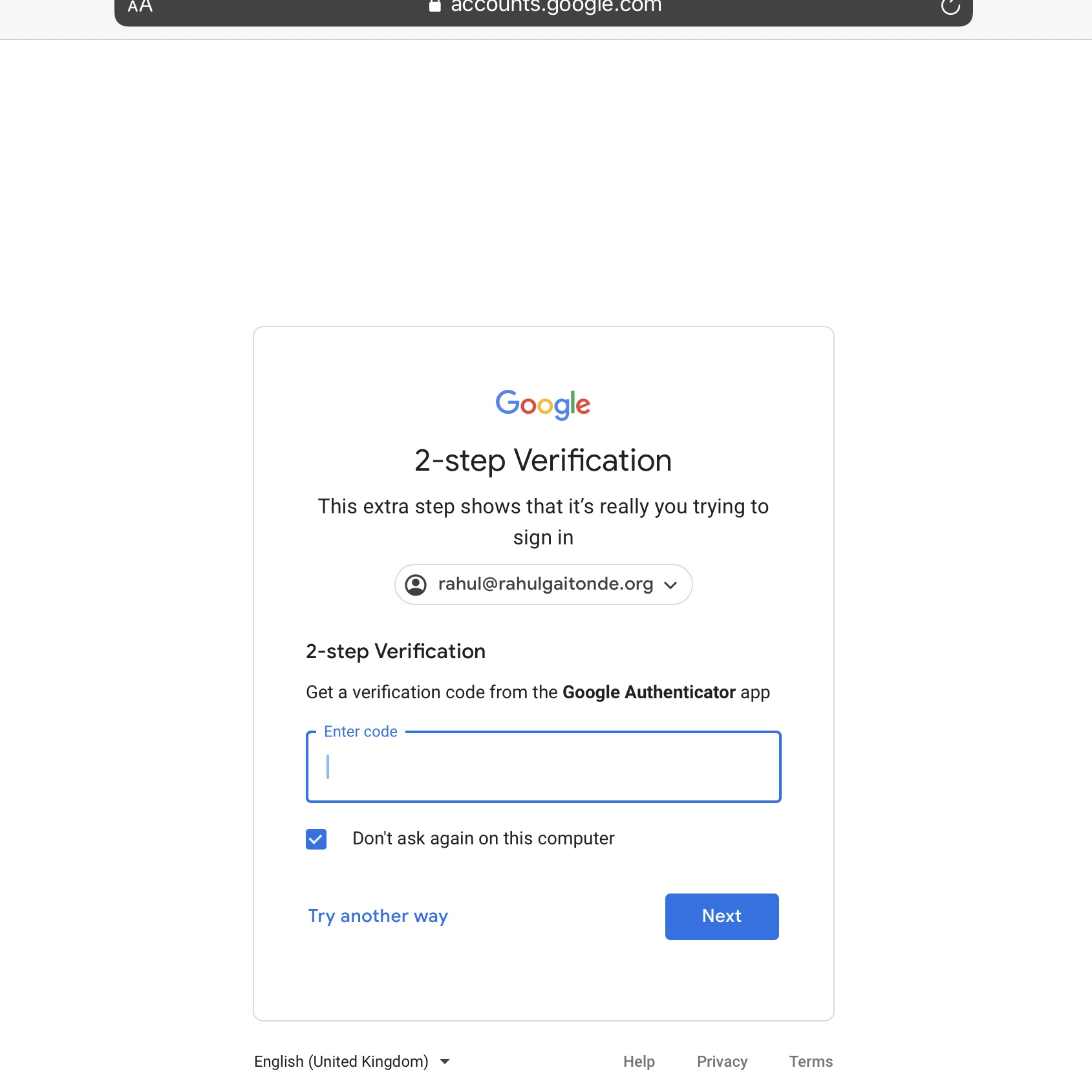
Google’s guides heavily promote their own Authenticator app over others like Authy. Even their code-based two-factor login screen refers only to the Google Authenticator app:
I’ll point you to Authy’s comparison guide, but here are the main bits: Google Authenticator is only available on mobile devices (not Macs or PCs), it can only be installed on one device at a time, it can’t restore from encrypted backups like Authy can.
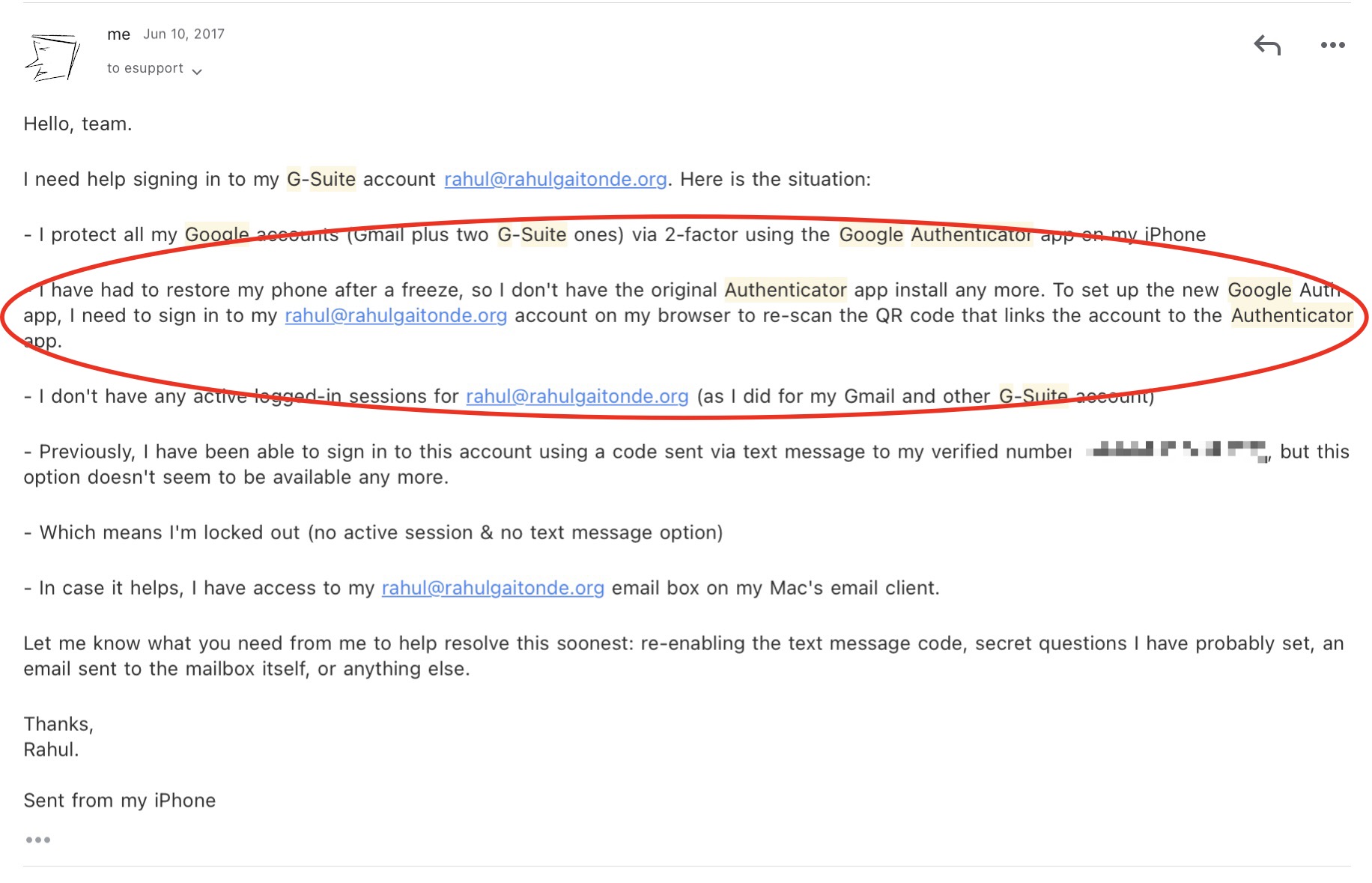
The one-device limitation has caused problems in the past,. Due to a combination of factors, I was once forced to reach out to Google support to restore access to my account:
If I had been able to install Google Authenticator on my iPad or Mac, this wouldn’t have been an issue at all.
Disclosure: I own stock in Twilio, which owns Authy. I have no other relationship with Authy and received no compensation from Twilio/Authy for this article.
… these ideas often formed at the seam of the “natives” versus the “immigrants.” If you are Instagram-native, what you consider a great idea for a new retail space or ecomm brand is likely very different than someone who isn’t exposed to the same thousands of pics…
The upcoming generation are using tech in a different way. They are Fortnite-native. Minecraft-native. They are streaming-native. They use “insta” differently. Food delivery will be considered a human right. The expectations will be very different.
I often think about how different generations think about the Megatrends and Big Questions that we explore on this site.
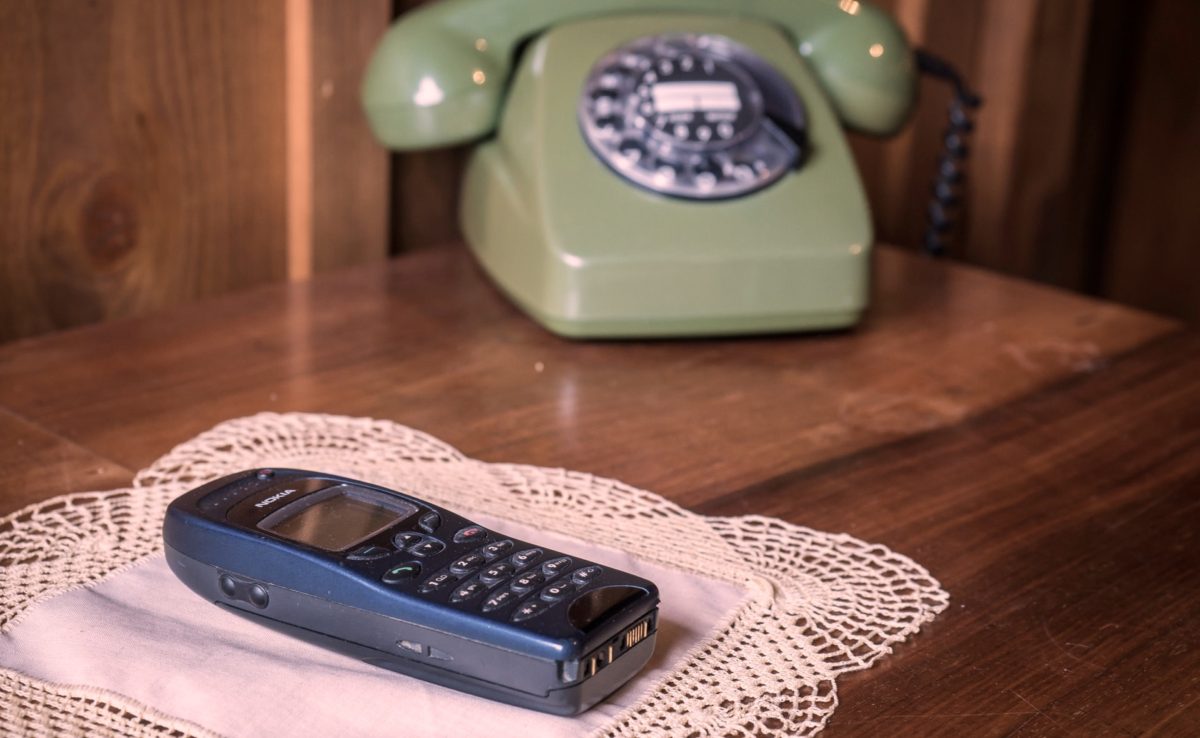
Xennials like me were born in a mostly analog world, but grew up when PCs became common in people’s houses. Millennials always had a PC in their houses, connected to the Internet, and grew up with Nokias and Motorolas. Gen Z have not experienced a life before smartphones with 3G connections.
I think that the answers to making the right choices about each of these issues is timeless, but it is the natives, to use Andrew Chen’s term in this context, who will get the word out most effectively. Building an audience will come naturally to them. And because they have navigated social networks in their most socially fraught years in school, are well aware of an audience’s value as capital.
Immigrants like me will use more traditional mediums, like this nearly two decade old blog, and traditional models, like the megatrends and big questions, to raise awareness.