To ensure that a service meets the needs of the customer (and not more than that) we use a process called “Working Backwards” in which you start with your customer and work your way backwards until you get to the minimum set of technology requirements to satisfy what you try to achieve.
Therefore, completely counter-intuitively,
Start by writing the Press Release. Nail it. The press release describes in a simple way what the product does and why it exists – what are the features and benefits. It needs to be very clear and to the point. Writing a press release up front clarifies how the world will see the product – not just how we think about it internally.
The good The $200 Amazon Echo Look lets you take voice-activated full-body selfies and short video clips that make it easy to catalog and keep track of your wardrobe. The hallmark feature, Style Check, provides input when you’re comparing two outfits, and the feedback is usually spot-on.
The bad The sound quality stinks. The app is missing features that would make it a more useful style adviser. It’s more expensive than other smart speakers in the Amazon family. And privacy concerns? I have a few.
Amazon is notifying at least some Look owners that they can get a free Echo Show 5 if they add the connected display to their cart and use the code ECHOLOOK20 by September 24th. It’s not clear if every customer is getting that offer, so don’t be surprised if it doesn’t work.
And that
Amazon is offering a free Amazon Photos account to store all of the users’ photos and videos through July 24, 2021. However, if they do not create an Amazon Photos account by July 24, 2021, the photos will no longer be accessible and deleted.
That’s it. If you spent USD 200 on a device, allowed it access to your wardrobe, not just passively but by actively taking photos, and relied on it to learn and give you suggestions, Amazon has left you with a piece of plastic and circuitry that will no longer work even though the device itself is undamaged.
For those of us who think that when we buy an Echo or such smart device, we are buying a device or appliance like a mixer or iron, it’s very different
Amazon thinks about devices as a means of providing services. If the device isn’t leading to more use of services or if the service can be delivered as effectively through another device that provides other benefits, then it follows that the original device can be eliminated or replaced
You’re spending an up-front non-refundable amount to let Amazon conduct an experiment on you and your data.
“When software and hardware are intertwined, does a warranty mean you stop supporting the hardware or does it mean that the manufacturer can intentionally disable it without consequence? Tony Fadell seems to believe the latter. Tony believes he has the right to reach into your home and pull the plug on your Nest products.”
In fact, Google last year shut down its entire Works With Nest program, designed explicitly to create an ecosystem of smart devices connected to the ecosystem of its subsidiary Nest. There would be no new integrations allowed and some – not all – integrations would have to be re-made with Google’s Assistant program.
These are all services. Not devices. And you pay an up-front cost to the manufacturer. Whether they continue to offer the service or not is entirely up to them. And whether you can use or repurpose the device – which you have already paid for – after they decide to shut the service down – is also entirely up to them.
This is the unequal relationship we agree to take part in. Let us make sure that decision is conscious and educated.
The first behavioural change is the total embrace of cloud-based storage. As a Macstories writer wrote during his essay on an iPad-first lifestyle:
Cloud storage is the only sane way to maintain files on the iPad. While many apps can save data locally to your device, that method doesn’t work at all like storage on a traditional computer – it’s not the default, instead it’s a niche, largely legacy feature. For the most seamless, pain-free file experience, the cloud is the way to go.
The immediate follow-up question becomes who you choose as the custodian of your data. Which cloud provider’s services do you rely on?
Apple of course is deeply integrated into the iOS experience with documents, contacts, calendar, email, notes, reminders, photos, music.
Google has long supported iOS for several apps – the earliest versions of iOS in fact included Google Maps and YouTube as default apps. One could argue that Google Photos is the best photos experience on any OS.
You can also use Dropbox or Box for Cloud storage, a dizzying variety of apps for managing calendars, notes and other productivity apps.
Which of course leads immediately to the Privacy and Anonymity question. Those parties which have custody of your data also have information on you. But there is also the question of how you stay private on the web. You can use Chrome and choose to stay logged-in to Google throughout, or you can use Mobile Safari in private mode. You can use Safari’s support for content blockers. You can also add an iOS-wide level of blocking with Adblock or Adguard or such, that runs as VPNs, trap DNS requests from any app on your browser and compare them against extensive blacklists. You can obscure your DNS requests with its 1.1.1.1 service. Unfortunately it appears since iOS won’t let you run more than one VPN service at the same time, you can either use 1.1.1.1 or one of the above DNS-based ad blockers. There still doesn’t exist an equivalent of Tor on iOS.
Wellness when always-on – even if the iPad is a full-fledged computer, it’s still an iOS device, with instant sleep and wake, and a gigantic battery. It has the same social media apps. And chat apps. And stream video apps like Netflix and Amazon Video. And notifications. It’s every bit as addictive as an iPhone or Android phone, and with streaming media, even more. Its very flexibility as a productivity, creation and entertainment machine means you will need to be more conscious about its use. The iPad is the ultimate always-on machine.
Some thinking on what I write about on this blog. It isn’t centered around one single theme or topic. Nor it is a dump of all my interests. But there’s an intuitive sense of what is appropriate to write here versus on Twitter, or on my Tumblr, or restrict to 1:1/group conversations.
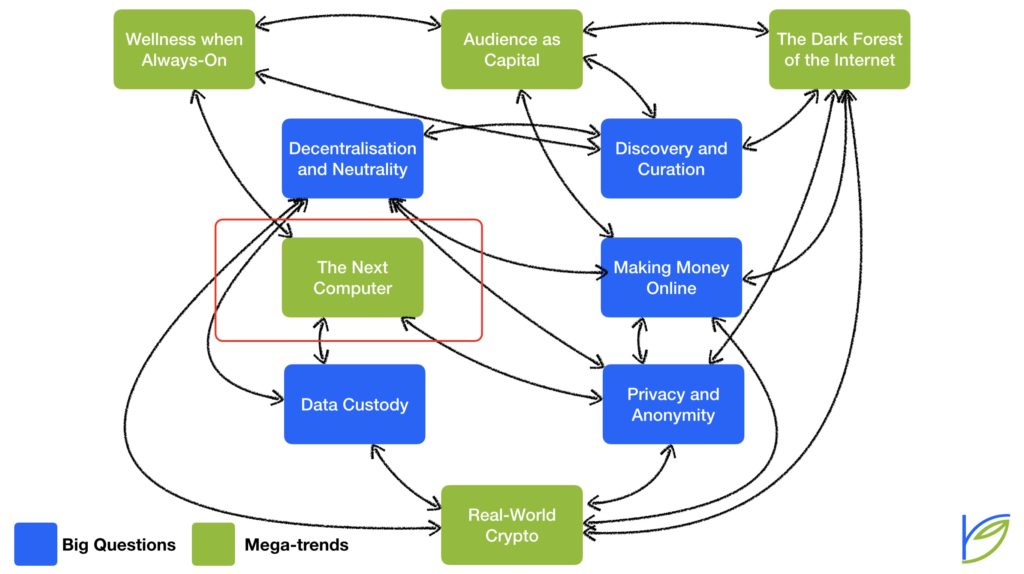
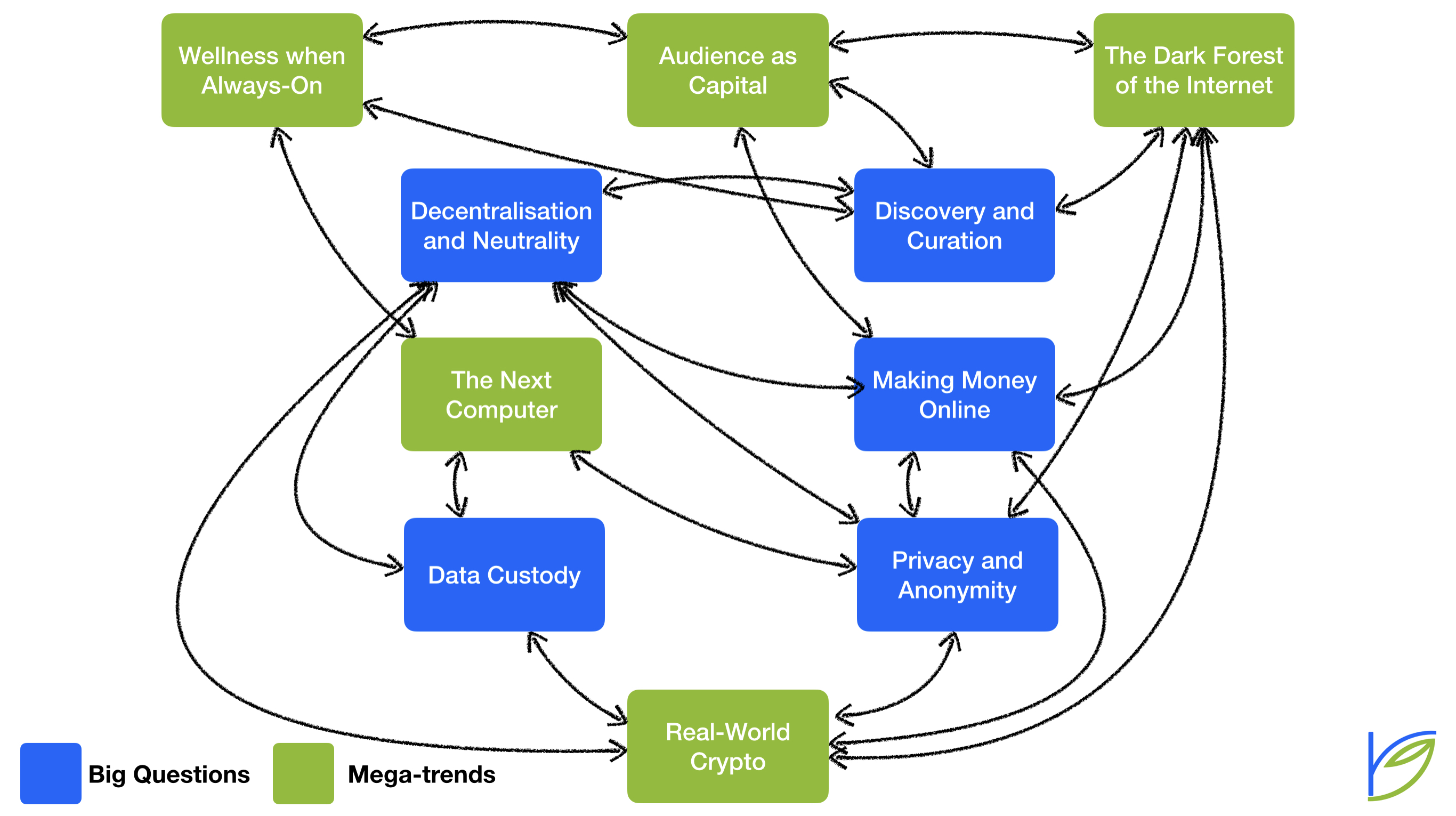
To articulate this for myself, I looked back at the last ~6 months of posts and attempted to categorise them. After spending some time with the categorisation, it turns out what I’m interested in are five ‘mega-trends’ and five ‘big questions’:
Mega-trends
The Next Computer: the inevitable move to iPad, iOS, apps and new interaction models
Wellness when Always-On: the growing awareness of the effects of the onslaught of information and endless entertainment on our mental health, changing norms, responses to it
Audience as Capital: those who have a large following online are disproportionately more advantaged than those that don’t, and this gap is likely to grow
The Dark Forest of the Internet: the inexorable polarisation of discourse on the internet along with norms like cancel culture is driving more and more conversation to private networks, changing equations of value capture and creating new cultures (the term is from here)
Real World Crypto: distributed ledger technology, or ‘cryptocurrency’ is finding real-world use-cases beyond speculative trading and use as payment in ‘dark web’ transactions. There will be consumer use cases such as those being built by Blockstack, there will be other B2B use cases such as in settlements, with the merging of movement of information and movement of money
Big Questions
Digital Custody: as basically all our personal information moves ‘online’, from our calendar to our health data to our memories, which parties will we entrust it with for the short term, for our lifetimes, and to hand over to our children?
Discovery and Curation: with an unimaginable abundance of content online, but also increased polarisation, a bias towards sensationalism, how will people create their own model of the world around them?
Making Money Online: for the last two decades, advertising has been the primary revenue model, leading to a vast data-gathering industry. That is changing with subscriptions, but such costs add up. Micro-payments have always been just over the horizon. Will there exist multiple business models online? Additionally, what room for open source and just plain altruism, which may be the core spirit of the internet?
Privacy and Anonymity: the increasingly centralised internet and the dominance of ad-supported models have led to a general decline in privacy and the perceived value of anonymity. With increasing awareness of the value of one’s personal information and alternatives to pure ad-based models, what future norms around privacy will evolve?
Decentralisation and Neutrality: unlike the early days of the internet, just a few large companies have captured most of the attention, information and money on the internet. The imbalance of power between the average person online and these internet giants is immense. Governments and telecoms alike have immense power over what parts of the internet are accessible, to whom, and how well. Will this imbalance get worse or correct itself?
Obviously, there are other megatrends evolving. There are other big questions people are finding answers to. Even just in ‘tech’. But these are the ones that I find interesting, and what ultimately define what you will find on this website.
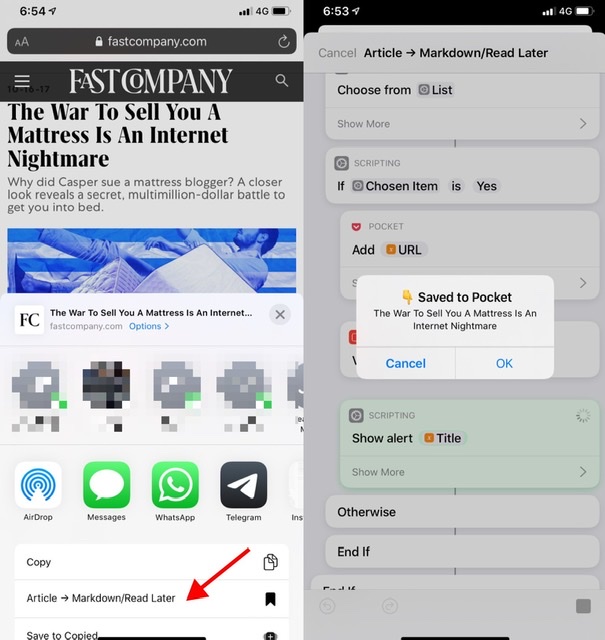
I finally created an iOS Shortcut I’ve wanted for a while. Here’s the description:
200527 – Saves Markdown-formatted article to iCloud Drive → Shortcuts → To Read for further cataloging. – Prepends title and URL to article body – Prepends yymmdd to the file name – Adds today’s date, article title and article URL to iCloud Drive → Shortcuts → Lists → Instapaper Log.txt – Optionally adds the article to Instapaper OR Pocket OR Evernote
The genesis of this was my desire to create an open-format archive of articles for the long-term. This was to be separate from a reading queue, which I send to Instapaper. This was also separate from my browser bookmarks, which are articles of interest I may want to return to at some future point.
At the same time, I had a monthly schedule to back up my Instapaper and Pocket by export each of them, as well as exporting the bookmarks. Both manual processes.
Eventually I wondered why I couldn’t just merge all of these – long-term archives and short-term reading list and unknown-term bookmarks. The latter two’d benefit from being in open-format Markdown. And because they’d be saved in iCloud Drive, they’d all be automatically backed up.
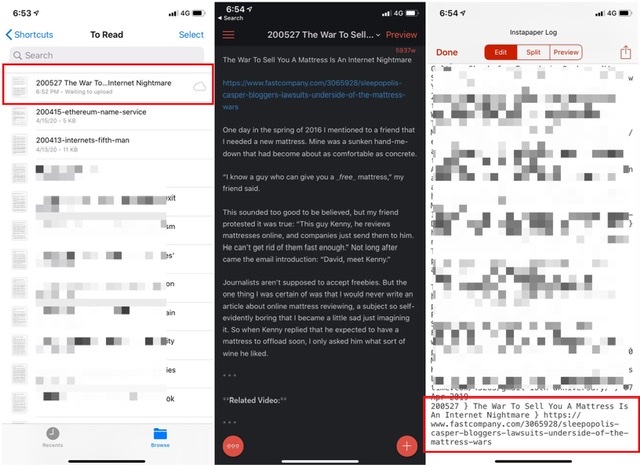
This Shortcut is a big step towards it. It saves any article I want into an iCloud Drive folder for future processing: I can either move those articles into folders for my Projects or Areas, or add them to a new folder I created for my reading queue, or I can move them to bookmarks. In addition, every article I add also gets logged to a CSV, thereby creating an easily searchable list for the future. Finally, the Shortcut also asks my if I want to add the article to any read-it-later service anyway.
The Shortcut in action
Left: the markdown file in the processing queue. Centre: the clean, stripped markdown. Right: the URL and article title in the log CSV
It’s wonderful and I’ve used it dozens of times already.
The immediate next step is to more clearly separately the three use cases. Essentially, ask up front if the save is for a bookmark, to read later, or long-term archival. It’s a simple enough matter to then save the files in different locations and log them to separate files.
What I’d really like to do for my read-later queue is to present myself with a list of all active projects and areas of responsibility, pick from one of them and have the markdown file moved there, obviating any manual processing later, even if it only takes a couple of minutes daily. I’m not comfortable with manipulating dictionaries yet, so this will make for a good project. I can either populate the list on-the-fly by reading my top-level project and areas folders, or I can store them in a persistent key-value-pair store like Data Jar.
I can also imagine myself using the very interesting Charty to generate visualisations of the number of articles I’ve sent to projects, bookmarks and archives during a given month. Which sites I’ve saved the most articles from. And the volume over time.
In closing – just like we’ve said that the iPad is the computer of the future, like it or not, Shortcuts are the future of programming.
“You can make something lasting. You wanna stop time, that’s what you wanna do. You want to live forever, right, Allen? Huh? In order to live forever, you have to stop time. In order to stop time, you have to exist in the moment, so strong as to stop time and prove your point. And if you succeed in doing that, everyone who comes in contact with what you’ve done — whatever it might be, whether you’ve carved a statue or painted a painting — will catch some of that; they’ll recognize that you have stopped time. They won’t realize it, but that’s what they’ll recognize, that you have stopped time. That’s a heroic feat!
– Bob Dylan to the poet Allen Ginsberg, 1977.
From the book Bob Dylan – Performing Artist 1986-1990 & Beyond Mind Out Of Time by Paul Williams
The announcement that the podcaster Joe Rogan will make his popular podcast exclusive to Spotify is interesting from the point of view of open formats, data ownership, and audience as the new capital, all themes we have explored before. This is about owning your audience.
I’m thinking most about Joe Rogan (JR) agreeing to insert an intermediary between him and his audience. It’s Spotify that wants JR’s audience:
This is less about scale because Rogan already has scale. This would seem to be about leveraging his scale in a few interesting ways.
The first is undoubtedly as a funnel to new Spotify users.⁴ While Spotify goes out of their way to note that the podcast will remain free, this just means that you don’t need to be a Spotify premium user. You will still need a Spotify account. Some percent of users that sign up for Rogan will undoubtedly convert to paid Spotify users, and that’s great. But even if they don’t, they’re now using Spotify as a podcasting app. Which means they’ll most likely be using it to listen to other podcasts as well.
Re: Rogan, the difference between $20m/yr and $100m/yr is negligible in terms of lifestyle. The difference between literally RUNNING YOUR OWN SHOW vs being content bait on someone else’s hook is immense.
We have discussed this before in the post Audience → Product. Having direct access to your own audience is a big competitive advantage for companies that make products, and it is equally – if not more – important for individual performers. The deal with Spotify limits, or at the very least brings some uncertainty to how JR can otherwise make money from his audience JR has less leverage now than earlier. We do not know what the contract says about merchandising independent of Spotify, or whether some content (“bonus episodes/extended content/video”) can be offered as a paid or separately ad-supported stream, again independent of Spotify. Whatever it is now, the option of whether to do/not do any of this is no longer solely JR’s. Plus it isn’t about what is possible now, but also what the parties’ relative bargaining positions are when the contract is up for renegotiation.
Finally, when I read about the deal, I contrasted this with Matt Taibbi’s move from being a writer at Rolling Stone to running his own paid newsletter hosted on the platform Substack. Even if the Substack email platform is technically an intermediary, you own your subscriber list. You can move your newsletter by simply exporting your audience from one platform and importing it into another. JR’s move is the opposite of that:
The magic of podcasting is that it’s free, open, and decentralized. Like email, when you have an audience (subscribers), you can reach them directly at any time, without any middle-man or algorithm (Facebook, Google, etc) getting in the way.
His existing podcast feed will likely die as most people eventually unsubscribe due to inactivity.
The market high of March 2000 was obviously a peak of insanity; less obvious but more important, it was also a peak of clarity. People looked far into the future, saw how much valuable new technology we would need to get there safely, and judged themselves capable of creating it. We still need new technology, and we may even need some 1999-style hubris and exuberance to get it.
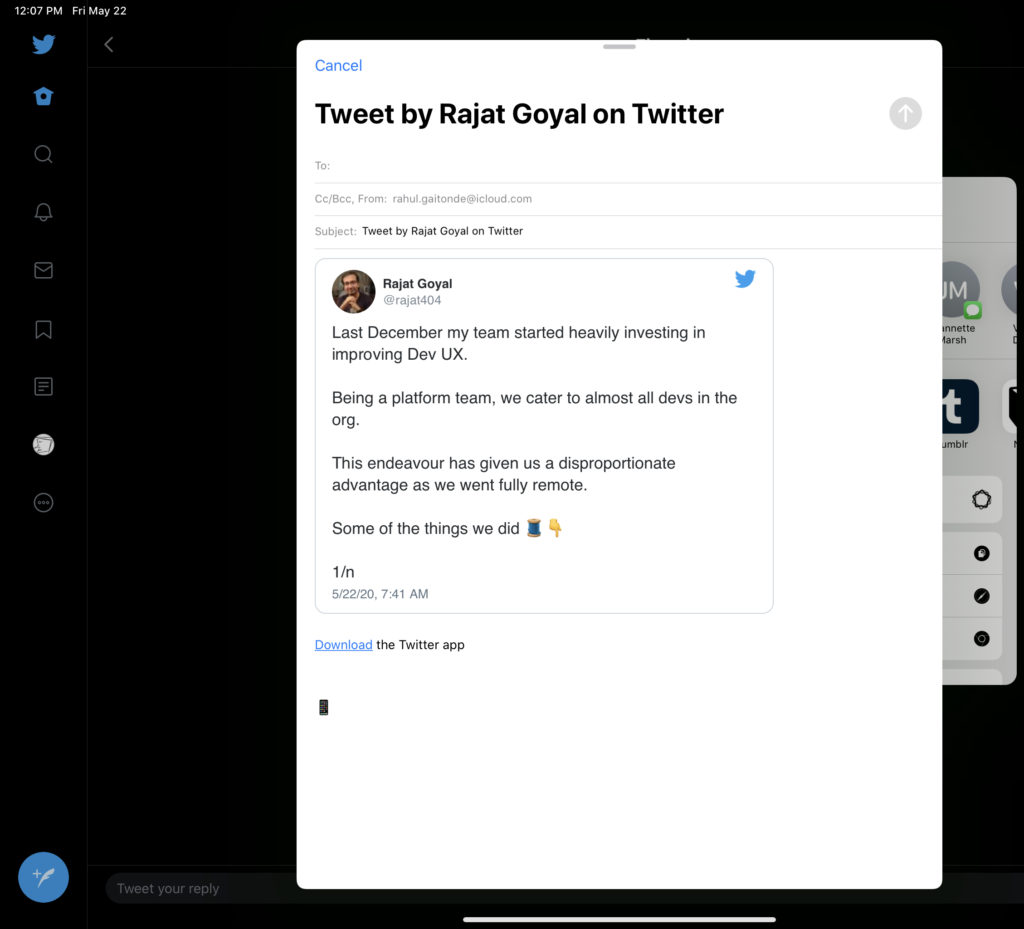
Whenever I find anything that’s interesting, I typically send it to Instapaper, which is where I do my reading. If it’s an article linked to in the tweet, sending to Instapaper is simple enough. If it’s the tweet itself, Email Tweet does the job. If it’s a Twitter thread, though, it’s not straightforward. Twitter’s own app can only email a single tweet:
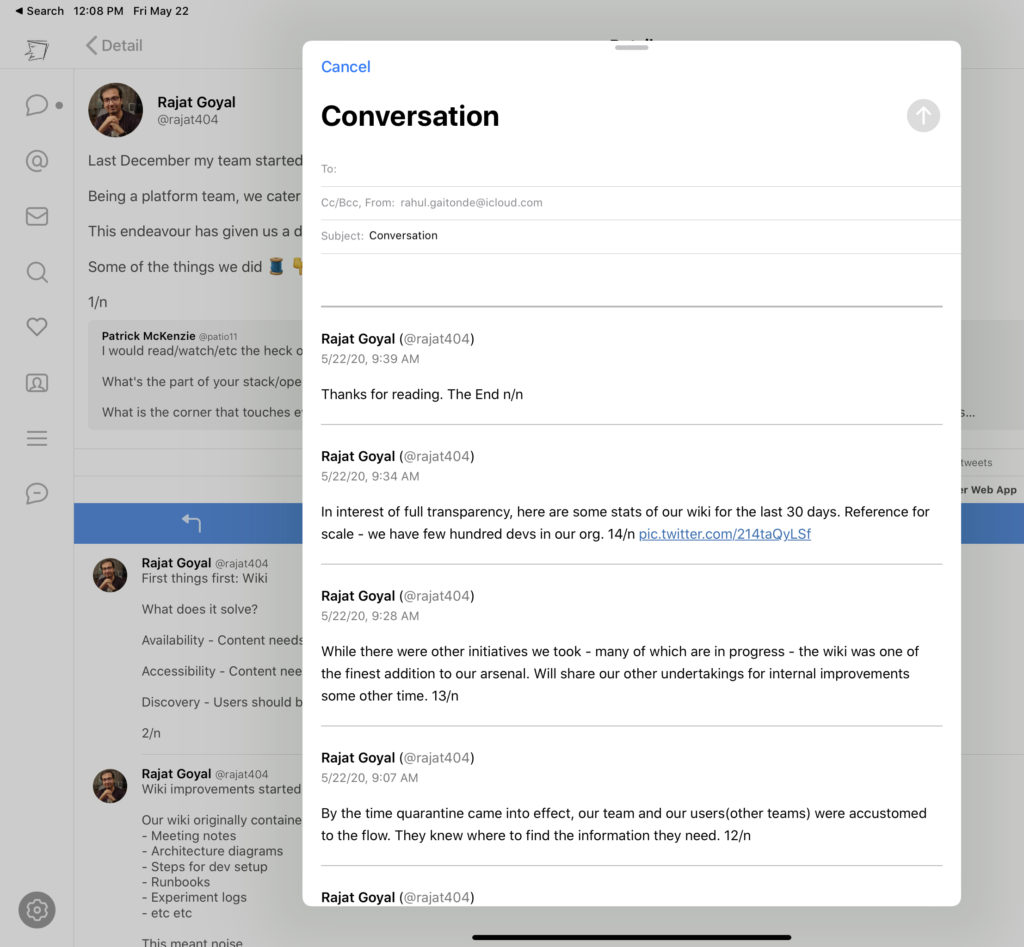
Tweetbot can email a thread, formatted quite well, but maddeningly it formats it reverse-chronologically, which is not how you want to show conversations:
This is unfortunate because the app itself formats it correctly.
I also add topics to my own Collections via the fantastic app Charm, which we have written about briefly before. It’s curious Twitter doesn’t expose Collections more. They do so much more than Bookmarks, which is the closest analog, though a pale one. As we have said in the blog post on Charm, there can be many Collections, and you can order the tweets within each.
I do not know where I will use these Collections yet. They will probably be embeds on future interest-specific pages on this website.
I use Twitter in more ways than I had realised. The main timeline, Lists and Topics for discovery. Plus curation via Collections. I look forward to moving from discovery to more engagement with other people on Twitter in the years to come.
PS: The venture capitalist Nick Grossman has created an interesting way to hijack Twitter as a commenting system instead of an on-blog system like WordPress’ own or Disqus. Here is the description. This is the sort of hack that I love the web for.