Categories
Products and Design The Next Computer

Thinking through sustainable computing

The programmer and writer Mark Pilgrim, nearly eleven years ago, talked about sustainable computing at the hardware, operating system and application layers – the same ones we discussed in the context of Apple’s Mac computers with its M1 chip. He was speaking in the context of building a computer he could use for twenty years.

About the hardware, Mark says

People throw away computers every day because they’re “too slow” to run the latest version of their preferred operating system. Linux (and open source in general) is not immune to this, but I think it’s more immune than proprietary operating systems. Debian only recently dropped official support for Motorola 68K machines; that’s stuff like the Mac IIci that I bought off the clearance rack at Microcenter in 1992. The latest version of Debian still runs on my old PowerPC “G4” Apple laptop, even though the latest version of Apple’s operating system doesn’t. Commercial vendors have a vested interest in upgrading you to the latest and greatest; supporting the old stuff is unglamorous and expensive.

About operating systems,

People think Linux driver support sucks because newer hardware sometimes only works with proprietary Windows drivers. That’s true, but there’s a lot more old hardware in the world than new hardware, and Linux has superior support for older hardware because the community writes and maintains their own drivers. People throw away computer accessories every day because they upgrade their operating system and can’t find functioning drivers… I’m not saying Linux never drops support for older hardware, but the cycle is longer and the incentives are different.

He makes sound arguments about open source application software too, and we have discussed them on this site over many years. But what he ends with has stayed with me ever since:

Where my 20-year plan will most likely fail is not at the operating system or driver level, nor with the existing crop of applications. At some point we will invent an entirely new class of application, like the web browser was an entirely new class of application 20 years ago. This new class of application will naturally be targeted at the “current” hardware of the day, and nobody will bother to backport it to the hardware I have now. Chromium is actually a good example of this, only shifted a few years. It contains a dynamic JavaScript compiler (V8) which requires explicit support for each hardware architecture. There is no Chromium for PowerPC, even though it’s open source, because a central piece of the application only works on x86 and AMD64 architectures. There’s nothing stopping anyone from writing a PowerPC version of V8, but it’s unlikely to happen unless some super-genius hobbyist decides to take it on. 

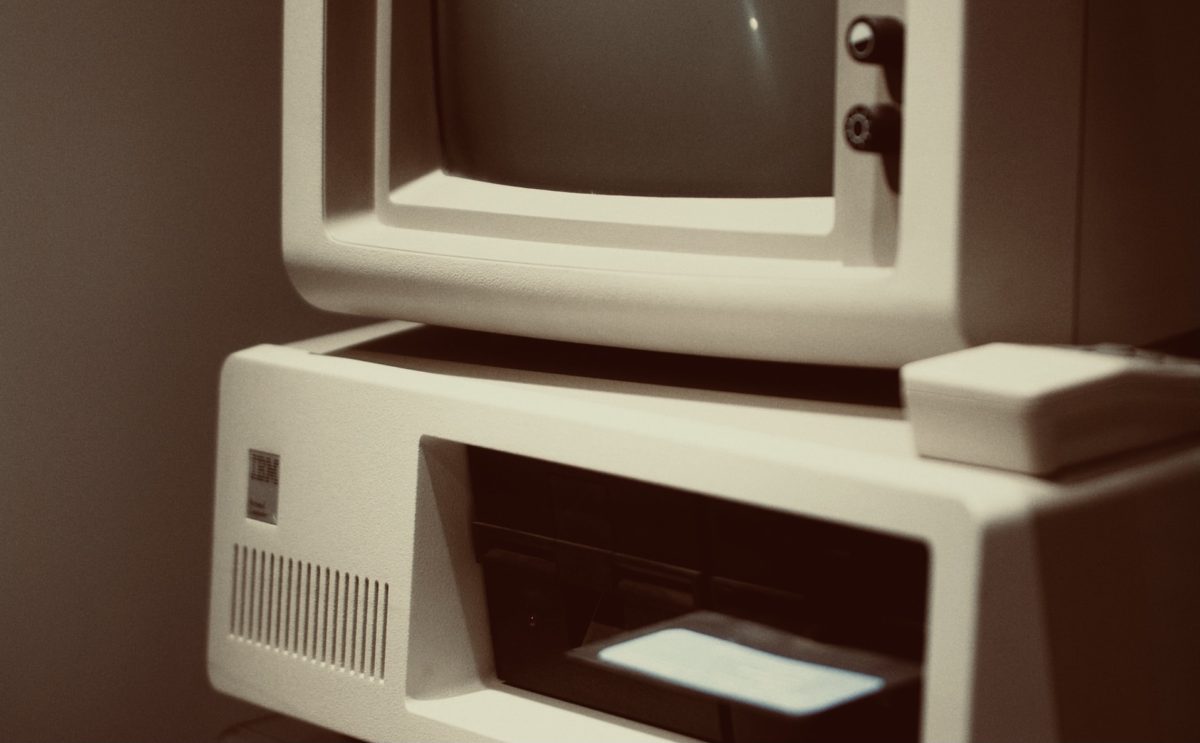
(Featured image photo credit: bert s z/Unsplash)

Categories
Data Custody The Next Computer

Desktops as resistance to closed, locked-down computers

In continuation from the 2-part series on how Apple’s creating truly locked-down, closed computers with the M1 chip, this blog post by a person who is considering moving to a self-assembled PC running Linux, in a quest for computing freedom:

What worries me as much as the end of general-purpose computing for the masses is that so few seem to understand that it is ending. Many are content to use “devices” that are merely stripped-down Internet appliances masquerading as reasonable substitutes for what they have replaced. Has the word “device” been substituted for the word “computer” in an effort to erase even the memory of what we are losing? Many do not understand, because they are too young to ever have used a true general-purpose computer. They have no experience with anything but locked-down platforms–just as 96% of the generation before them knew nothing but Microsoft operating systems. To call this a tragedy is not being overly dramatic.

People find ways around oppressive practices [but] I also know that solutions can sometimes take decades to appear. Whole generations can be lost in the mean time. This is why the trend toward stripped-down, Big-Brother-controlled computers has me genuinely worried. I am not looking forward to a near-term future in which my operating system is so locked down that I cannot install the software I want. Many have already reached this future, perhaps without even having realized it.

Categories
Data Custody The Next Computer

Apple M1 and the ultimate closed system – Part 2

(Part 1 – how Apple’s locked down your freedom to run software on the M1 Mac computers)

Control over application software, continued

One could imagine a worse scenario than restricting the distribution of ‘forbidden’ of binaries: the Mac is the development platform for MacOS, iOS and other Apple operating systems. The toolchain is entirely Apple’s, right down to the compiler/linker. It isn’t far-fetched at all for Apple to identify and refuse the compilation of code – that is, even if you managed to get hold of the youtube-dl source code, your Mac could refuse to turn it into an executable binary for you, even just to run on your own machine.

This is not an outlandish scenario. There have been countless examples of Apple taking software off its App Stores. But Apple has also revoked developer certificates for iOS before, most famously with Facebook. It is not hard to imagine Apple taking this one step further to disallow compilation of what it considers disallowed code.

The two big distinctions between an operating system for a ‘personal computer’ like a desktop or laptop, and one for a phone or tablet are (a) the ability to run arbitrary software on the machine and (b) the ability to build software for the machine on the machine. The freedom to do either on Big Sur for Apple Silicon is severely constrained.

2. The operating system is controlled

The bootloader on Apple Silicon machines will be locked. This means that they will not support booting into other operating systems like Linux.

The Apple software executive Craig Federighi confirmed this in a podcast shortly after WWDC:

“We’re not [allowing for] direct booting an alternate operating system. It’s purely virtualization…”

Reddit discussion thread referencing this

The Verge also referenced the same section of the podcast in the specific context of Apple’s BootCamp service with which people could dual-boot Windows and Mac OS on Intel Macs:

Apple later confirmed it’s not planning to support Boot Camp on ARM-based Macs in a Daring Fireball podcast. “We’re not direct booting an alternate operating system,” says Craig Federighi, Apple’s senior vice president of software engineering. “Purely virtualization is the route. These hypervisors can be very efficient, so the need to direct boot shouldn’t really be the concern.”

– Apple’s new ARM-based Macs won’t support Windows through Boot Camp

Of course I’d like to see a clear statement from Apple than a comment in a podcast, even if it was Federighi who made it.

But this means you also don’t have the option to use just the Mac hardware and install your own software, as people do with Linux (and Windows) on their Macs today. In other words, you cannot install an open source operating system with an open source toolchain to compile and run open-source software on the M1 Macs.

3. The architecture is controlled

The M1 (and all of Apple’s system-on-chips) are not licensed. This means only Apple can manufacture them, and consequently the only machines that can have M1 chips are Apple Macs.

This is as opposed to the thousands of different laptops, desktops, tablets, two-in-ones and other machines that run on x86 and x86_64. Intel, AMD, VIA and other companies typically only manufacture the processor, not entire system-on-chips. So you have computers with different processors, graphics cards, RAM and input-output capability, with different BIOS/UEFIs with support for different bootloaders and, therefore, different operating systems – even more than one on the same computer.

But so in the Apple world there’s no concept of buying an ‘alternative’ M1 machine with an unlocked bootloader so you can install Linux or BSD or another open OS on it.

The lock-down is utter and total.

Summing up

So. MacOS on the Apple M1 Mac computers severely limits what software you can run on it. The locked bootloader prevents the installation of anything other than MacOS. And the proprietary nature of the chip prevents the existence of any alternative M1 computers without locked bootloaders.

For most people – Apple’s customers – these restrictions are all a net positive. They make their computer safer. Developers that make software for ordinary people now have to jump through some additional hoops, but that is in order to make things difficult for malware creators.

But for those who value openness and want control over their software, the M1 machines are closed at every layer of the stack. Look for alternatives.

Update: Point 2 may have changed. Here’s a Reddit discussion that points to a WWDC 2020 video stating that non-signed operating systems can be made to run on M1 Macs. I’m speaking to people to understand this better. If this is true, it also makes Point 3 moot, though not untrue.


Also read:

Categories
Uncategorized

The Verge:

The MacBook Air is now only available with Apple silicon chips. It’s no longer possible to buy a MacBook Air with an Intel CPU.

That was fast.

Categories
Data Custody The Next Computer

Apple M1 and the ultimate closed system – Part 1

Apple this week announced new Mac laptops and a desktop computer with its in-house system-on-chip. These computers do not use Intel’s processors. Instead, the “M1” chip includes Apple’s own CPU, RAM, graphics chip, and special-purpose chips for security and for machine learning.

By designing the Mac operating system specifically for this hardware (and vice versa), Apple’s M1 computers are now much more powerful at the same power consumption levels than their equivalent Intel ones.

However, with this chip, Apple’s computers are well and truly closed machines.

This closed nature is a problem because of just how much control it takes away from you, who’s paid for and ostensibly owns the machine and the software on it.

Let’s see just how bad it is.

1. Application software is controlled

The question is one of control over the software that you can run on the machine. With the M1, Apple will only allow signed software to run. From Apple’s documentation ealier this year:

New in macOS 11 on Apple silicon Mac computers, and starting in the next macOS Big Sur 11 beta, the operating system will enforce that any executable must be signed with a valid signature before it’s allowed to run.

This other article describes this in a little more detail:

Over the years, Gatekeeper has become more strict, recently adding a notarization requirement. On macOS Catalina, Gatekeeper not only checks whether the software was signed by a valid Developer ID certificate, it also “phones home” to check whether Apple has notarized the software, again refusing to run it if the check fails. Mac developers must sign up for the Apple Developer Program, sign a legal agreement, and pay an annual fee of USD $99 plus tax in order to obtain a Developer ID code signing certificate and upload software to Apple for notarization.

This article goes on to describe how – while not obvious – one could override these warnings on Catalina and run unsigned software. On MacOS Big Sur running on the M1 chip, Apple appears to have removed this exception. No matter what software you download and run – whether command-line tools or graphical applications – they will need to be signed.

This level of control means that Apple could refuse to sign certain apps if it wanted to, for reasons that have nothing to do with security. We have recently discussed how the youtube-dl project was taken off the code hosting site github. In the future, should Apple decide, it could disallow the running of youtube-dl binaries entirely, either downloaded from github or sourceforge or others. The only way that anyone would be able to run this tool would be to download the source code, compile it themselves and run it on their computers only by issuing themselves a local certificate to sign with. But they would not be able to hand that compiled code to someone else – even another Apple M1 machine they own – without compiling it separately.

That effectively kills distribution for software that Apple chooses to censor.

A long-time iOS engineer I know, who I ran this post by, had the following counterpoint:

Apple is definitely making it a pain for anyone to arbitrarily run 3rd party executable code, but to me the end result is just that developers will have to jump through a few more hoops. There will probably be a homebrew/pip/npm like solution that solves this soon. The end user should not see any significant change if they’re coming from modern Macs.

As for the Developer ID requirement – anecdotally I have only heard of one developer whose certificates were unilaterally revoked. Apple is far more likely to suspend your developer account and leave the certificates. This still makes Apple the arbiter of what you can run on your computer, and they will charge the developer for that privilege, but if you’ve only ever run GUI apps on your Mac this has been effectively the case for several years.

However, even Mac OS Catalina, leave alone Big Sur, appears to check for notarization of unsigned executables – even those not built using XCode. A simple hello world program compiled directly using clang is still subject to the same notarization check.

(Part 2 – It’s not just software; it’s control at the Operating System level and at the chip level)

Categories
Discovery and Curation Wellness when Always-On

Switching off from alternate realities to focus on the real one

Conviction in your own opinions is tough when you’re exposed to millions of people living in their alternate realities.

The Biden campaign decided that to focus on the ‘actual’ reality – and change it – they’d need to turn off that exposure.

You and I aren’t bringing about massive social change everyday, so we don’t necessarily need to cut ourselves off the way the campaign did. But it’s good to set aside some time during the week thinking about stuff that matters to you – however trivial that might be – independent of what people say about it online.

Categories
Wellness when Always-On

Anxiety and awareness

In an article on handling anxiety:

Ask yourself why you’re anxious. Is it because you’re excited? How you interpret anxiety could be good or bad. If you’re about to give a speech, for example, anxiety is good. Instead of trying to avoid it, understand it.

I think parts of the article are platitudinous, but this is spot-on.

There is simply too much information thrown at us all day each day. There’s years of evidence that shows our brains are not properly wired to consume, triage, process and respond to all of it. More often than not, they simply jump from consume to react.

They react to notifications. To ads on a web page. To dialog boxes asking for decisions to be made. To visual complexity in software interfaces. And this is just on our computers and phones. We have discussed before how our public spaces, especially in developing countries, are suffused with visual and auditory advertising and messaging.

Is it any surprise, then, that we are in a state of anxiety? Perhaps perpetual low-grade anxiety?

Personally, anxiety causes breathing to become shallower. It causes my shoulders to tense. It causes me to be less aware of when I need water. These lead to migraines. The necessity of getting through the day while in pain leads to more anxiety.

Earlier this year I decided to break the chain by simply being more aware of how I was physically at any given moment – I figured that your physical state is easier to observe objectively than your mental state. In January, I began training myself to breathe deeply and evenly. The next month, I began tracking my water intake – first via an iOS shortcut, then in the Fitbit app. In June, I began observing when my shoulders had begun to tense.

This has reduced how long I stay anxious before I notice it. I’m not anywhere as good as I’d like to be, but I’m getting there.

The article I linked to above goes deeper. When the writer recommends ‘understanding your anxiety’, she says

It’s often not the event that causes anxiety; it’s the story we tell ourselves about it.

And therefore

When this happens, take a long walk or breathe deeply if you have too much anxiety. Meditation is a force that helps you live in the present moment. “When you meditate, you get a better sense of how your body and mind are reacting,” he says. “Deep breathing creates a direct connection between your breath and reducing stress…

I agree. Awareness of one’s physical situation addresses the symptoms of one’s anxiety. I’ve found that reducing anxiety itself requires you to switch your brain from consumption mode to reflection mode.

Meditation, specifically mindful meditation, does this well, but it’s not easy. If you end up silently criticising yourself every time you find your mind has wandered away, it simply causes more anxiety and makes for an unhappy meditation session. But over time, you become less hard on yourself .Choiceless awareness, as the thinker J Krishnamurti termed it, removes anxiety from the equation because you are now looking at how anxiety comes about, as opposed to being ‘in’ the anxiety. As the writer says

You can get a sense of the source of the anxiety, peel back the onion, and find the cause.

If you aren’t comfortable with mediation yet, I have found a short daily period of solitude to be quite helpful too.

(Article via Jitin B)


(Featured image photo credit: Ray Zhou/Unsplash)

Categories
Data Custody Decentralisation and Neutrality Products and Design The Next Computer

Tesla remotely disabling functionality in cars

From Vice:

a person… bought a used Tesla from a dealer—who in turn bought it at auction directly from Tesla under California’s lemon law buyback program—advertised as having Autopilot, the company’s Advanced Driver Assistance System. The entire Autopilot package, which the car had when the dealer bought it, costs an extra $8,000. Then, Tesla remotely removed the software because “Full-Self Driving was not a feature that you had paid for.” Tesla said if the customer wanted Autopilot back, he’d have to fork over the $8,000.

To be clear, this is not a subscription service. This is a one-time package that was paid for by the original buyer, upgrading the car’s capabilities over software. Tesla’s policy here is that the purchase belongs to the owner, not to the car. There still appears to be confusion about whether enhancements can be transferred to the new owner. I couldn’t find anything on Tesla’s site, but found these two contrasting threads. One, on Tesla Motors Club titled “Why is FSD not transferable to your next Tesla?” FSD is full self-driving. The second is on the Only Used Teslas site, “Does Autopilot/Full Self-Driving Transfer to Subsequent Owners?” which states that it in fact does:

Q: What about owners who added Autopilot and/or Full Self-Driving Capability after delivery? A: Those features will also be active for the life of the car, and will transfer from the current owner’s Tesla account to the next owner’s account.

The tech news site The Next Web also did an article on this, stating

TNW spoke with a number of new and used Tesla sales departments in the UK who all confirmed that if a second-hand Tesla is specified with additional options like Autopilot and FSD, that is what the customer will receive.

In the case of the individual mentioned in the Vice article, Tesla did restore the functionality the original owner had bought, but only after the car enthusiast website Jalopnik ran an article about it – and Vice and The Next Web.

We have seen before (here and here and here) about “smart” devices that you do not own despite having paid full price for. A Tesla seems to be among the most expensive one in that list.

I’m not advocating for or against buying a Tesla – or for that matter any smart device [1]. I do think we should be more conscious, more circumspect when we buy new devices, since an increasing number of them have electronics, a connection to the Internet, and a link to the manufacturer throughout their lifetimes.

Advertising is sexy. Skepticism never is.


[1] I had in fact paid the deposit for two Model 3 units when they were announced in 2016 (and had it refunded when it was clear Tesla would not be launching in India any time soon).


(Featured image photo credits: Bram Van Oost/Unsplash)

Categories
Wellness when Always-On

Outdoors, but without its social elements

… the Scandinavian concept known as friluftsliv (pronounced “free-loofts-leev”), which translates most directly to “free-air life.” The term is attributed to Norwegian playwright Henrik Ibsen, but the concept of spending time outdoors in all seasons long predates him as a deep-seated element of life in the Nordic countries.

But in Norway, it’s this deeper concept of having space from other people, which is kind of a Norwegian thing to do, and then it has that sense of being able to wander freely outside.”

We belong out there’: How the Nordic concept of friluftsliv — outdoor life — could help the Pacific Northwest get through this COVID winter

Lovely. But for most of us, this is what the outdoor experience has in fact become during the pandemic. Sounds like an introvert’s dream come true.

Categories
The Next Computer

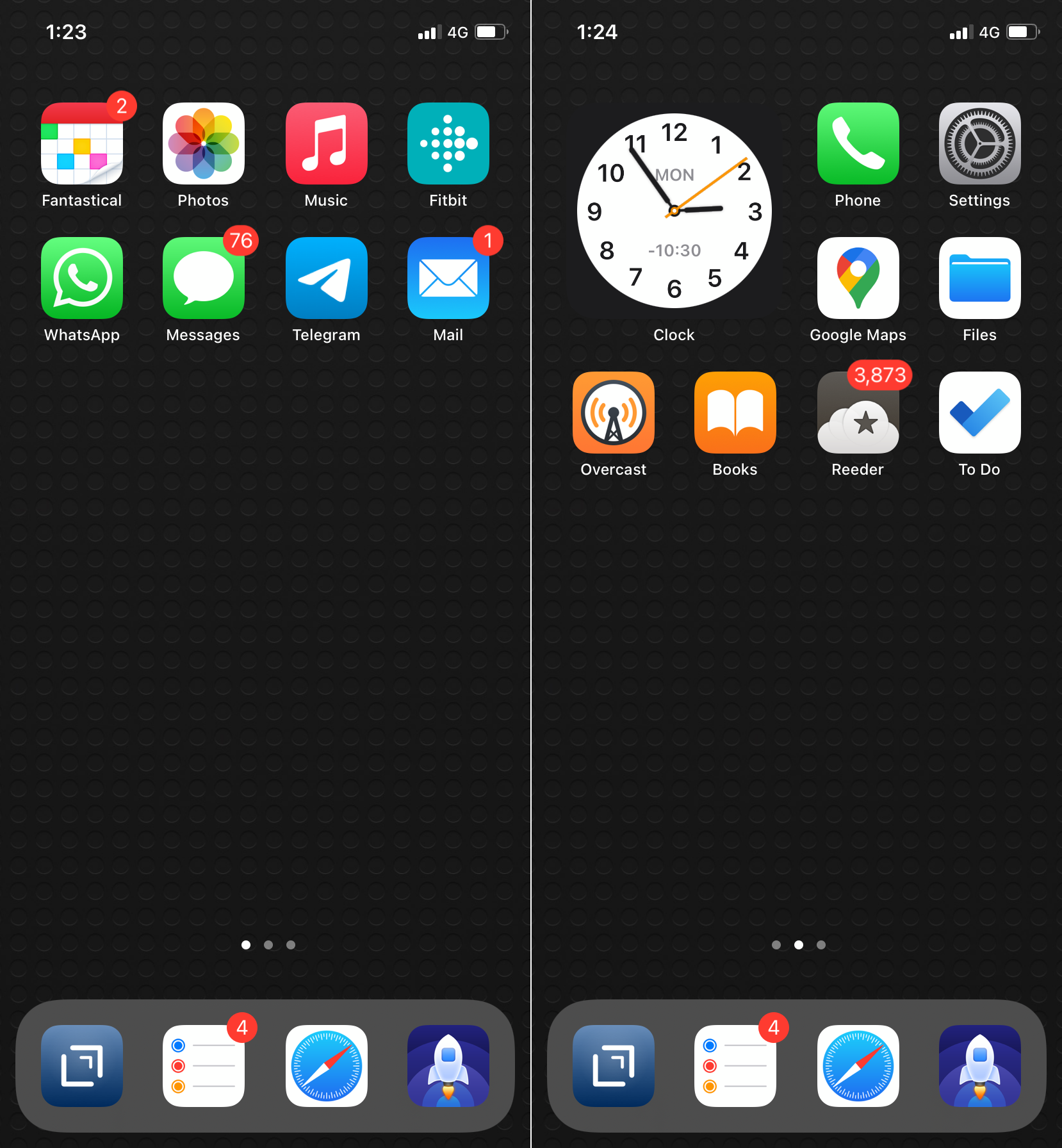
iPhone home screen, November 2020

(See August, September, October home screens)

First home screen

On the first/main home screen, the Microsoft Todo app in the Dock has been replaced with Reminders. I don’t use either app much on the phone, but Reminders is marginally more useful for the one purpose it serves.

As we’ve discussed before, I use Microsoft Todo as a task manager organised according to the PARA principle, with a list of each of my Projects. This site is one such project, and it lists both ideas for future posts as well as improvements to the site itself. In that role, I use it more on the iPad and on my Mac. That’s why on the iPhone it’s been moved out of the Dock and the main home screen.

The rest of the first screen remains unchanged:

  • Drafts for all-purpose text capture. I’m writing this blog post in Drafts
  • Reminders
  • Safari (with the 1Blocker content blocker)
  • Launch Center Pro (a beloved app, but whose use diminishes with each passing month. I would not be surprised if something changed here soon)
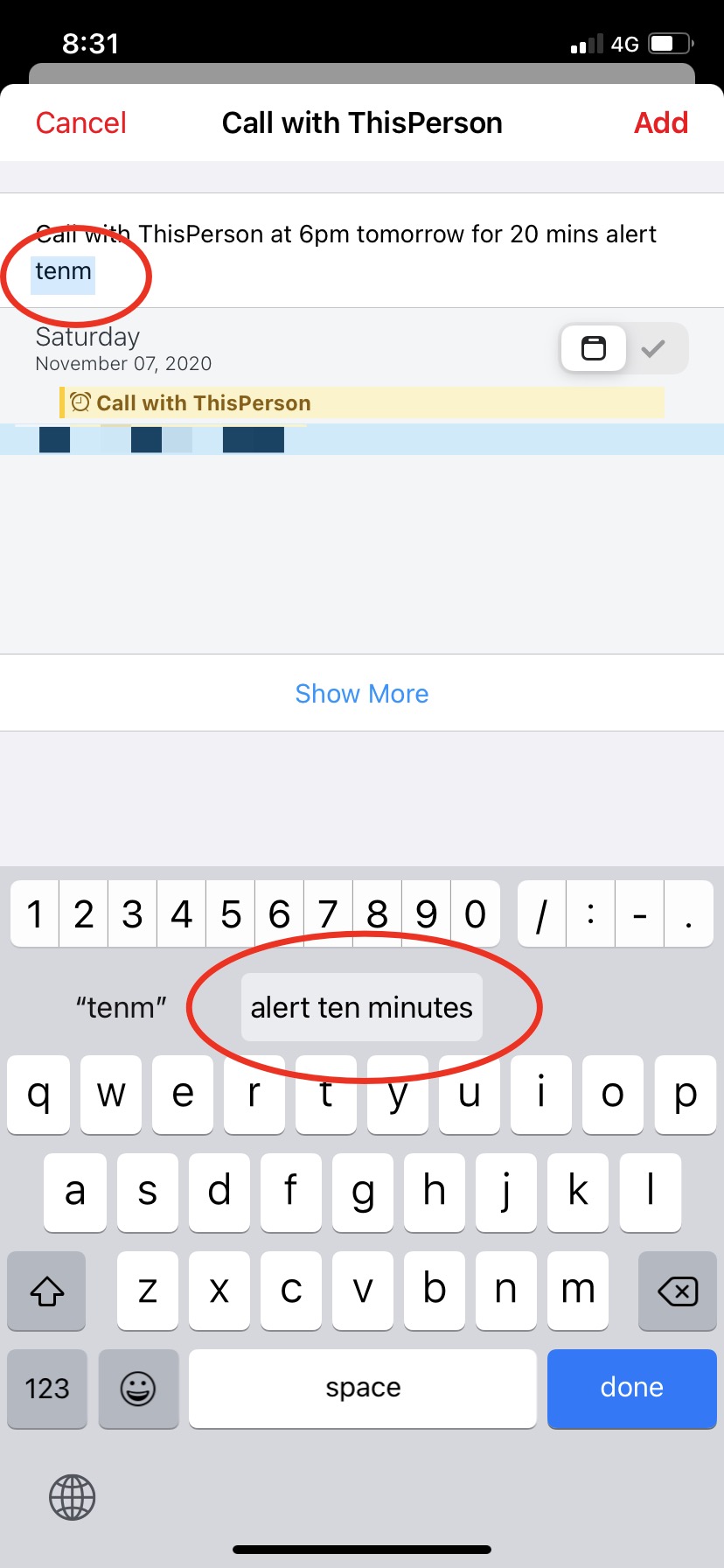
  • Fantastical: I love it for its natural-language input. Typing “Call with {Name} at 6pm tomorrow for 20 minutes alert ten minutes” is now second nature. I also have an iOS Text Replacement so that typing “tenm” auto-expands to “alert ten minutes”
  • Photos, Music: I use these default iOS apps multiple times everyday
  • Whatsapp, iMessage, Telegram, Mail: messaging and email. Daily use
  • Fitbit: we’ve discussed this many times before. I use my Fitbit to maintain a basic level of activity daily: 5000 steps, 5 days of exercise, 10 hours of activity, 3 litres of water and so on.

Second home screen

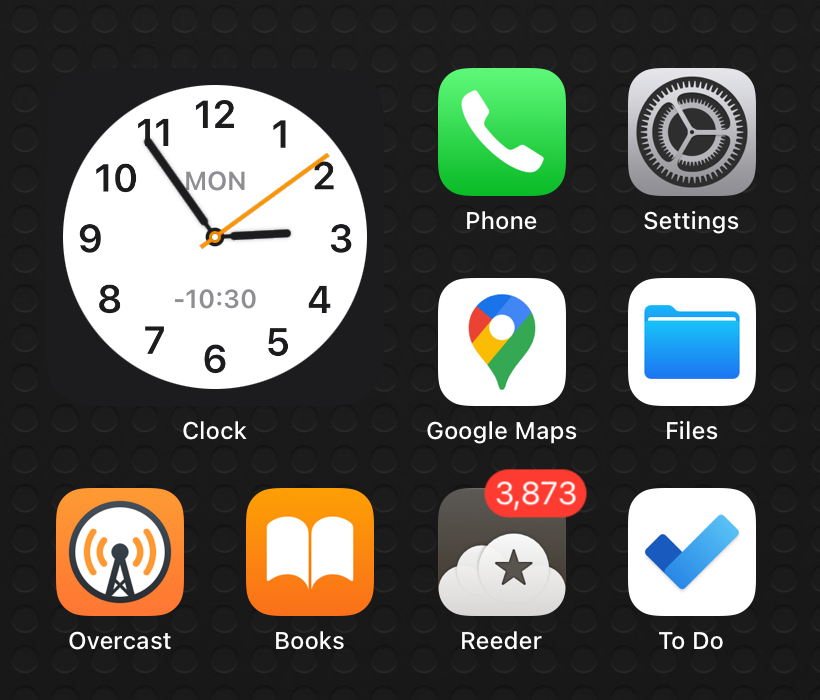
The big change on the second screen is the clock widget, which displays time on the USA East Coast. I know and communicate with a few people in that time zone, so it’s useful to quickly look up the time there.

I have not picked the other apps on this screen as mindfully as on the first, but they are fairly regularly used:

  • Phone, Settings: vanilla apps with no replacement
  • Files: I rely heavily on iCloud Drive
  • Overcast: podcasts for when I drive. I don’t commute anymore but I do drive to different places in the city for half an hour or so every day to get outdoors time.
  • Books: we’ve discussed before about how Apple Books (formerly iBooks) helps foster a daily reading habit. I read a little over twenty minutes most days. This is a list of the books I’ve read this and previous years
  • Reeder: my longtime RSS app. I recently bought version 5 (read the MacStories review), as I have all previous versions. I don’t read on the phone much, so this does not get a lot of use on this device.

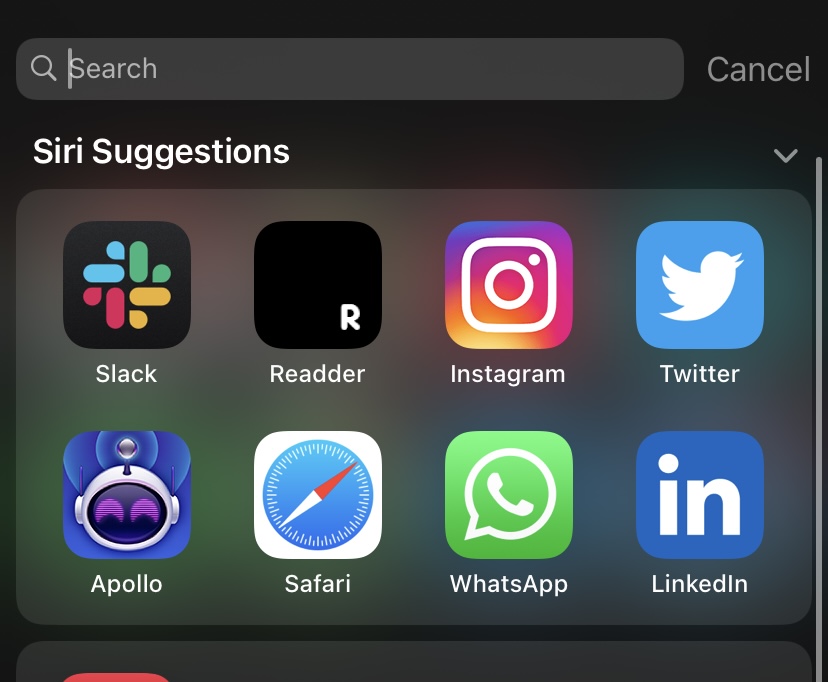
Siri suggestions

This is what I end up using more than my actual home screens. It is the source of both my productivity and distraction. These are my suggestions as of this writing:

  • I’m glad that Slack is just a swipe and tap away. This is the main communication tool at the day job.
  • I don’t know why Linkedin shows up. Perhaps because I’m writing this post during the daytime on a weekday and Apple’s algorithms think the app is useful during the workday? I rarely use the app itself
  • Ditto Instagram. I barely use the app. A couple of months ago, I created an account to post about coffee and home gardening, two of my other interests. But I don’t follow or scroll through other people’s feeds, so I have no idea what it’s doing here.
  • Readder and Apollo: just yesterday we saw how I have unhealthy Reddit habits, and that I am checking into another thirty-day Reddit rehab. Siri suggestions is the main reason I end up launching them – after all they are nowhere on my home screens. I have since disabled them from showing up in Siri Suggestions through their settings (see how)